

Good electrician website design makes it easy for a local customer to see what you do, where you work and how to ring you from a phone. It's also a ranking signal: Google ranks the mobile version of a site, and its ranking systems look to reward a good page experience. The best electrician websites keep it plain: one page per service, a tap-to-call number, real proof and fast pages. Electrician SEO Pro judges an electrician's website on whether it turns visits into calls.
What do the best electrician websites have in common?
The best electrician websites have four things in common: the phone number is impossible to miss, every main service has its own page, real proof shows the electrician is qualified and trusted, and the whole site works quickly on a phone. None of that depends on fancy design. In Electrician SEO Pro's view, the best electrician website is the one that gets a worried homeowner from Google to a phone call with the least effort, which is why plain, clear and fast beats clever.
Plenty of electrician websites look like they were built in 2007 and haven't been touched since. But your website isn't a digital business card. It's the one thing that keeps working for you while you're on the tools, or asleep.
A good electrician website isn't flashy. It's focused. Every page should nudge the visitor towards calling you, booking a job or asking for a quote. Here's the kind of homepage header I like to see:
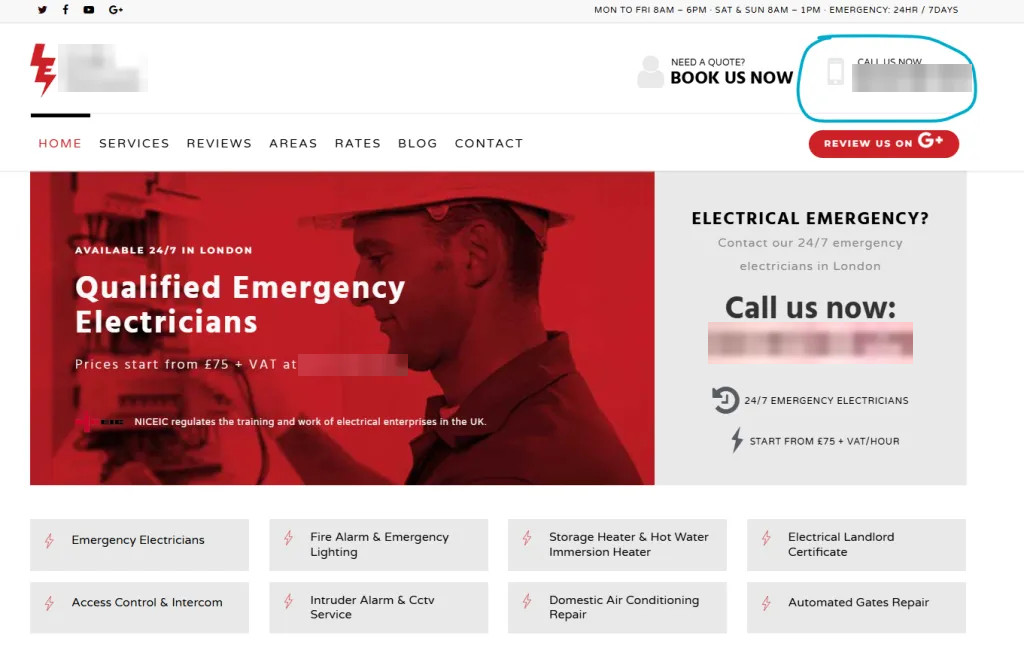
Number top right. A big "call us now" panel next to the banner. Named services underneath. You know what they do and how to reach them before you've scrolled an inch.
So a good site helps customers. But does the design affect where you rank?
Is website design a ranking signal for electricians?
Yes, website design is a ranking signal for electricians, because Google ranks the mobile version of a site and its ranking systems use Core Web Vitals, which measure how fast and stable pages feel to a visitor. A slow, broken or awkward site on a phone works against you; a quick, clean one works for you. Electrician SEO Pro treats design as a real ranking factor with one plain limit: relevance comes first, so a fast, good-looking site won't beat a more relevant page on its own. It has to sit on top of proper service pages and useful content.
Both halves come from Google. Its mobile-first indexing guide says Google uses the mobile version of a site's content for indexing and ranking. Its page experience guide says Core Web Vitals are used by its ranking systems, and its list of what makes a good page experience is mostly design: good Core Web Vitals, HTTPS, content that displays well on mobile, no intrusive pop-ups, and main content that's easy to tell apart from everything else.
Here's a PageSpeed Insights mobile result for my own site, captured in April 2025. Under 80 on mobile is a problem:
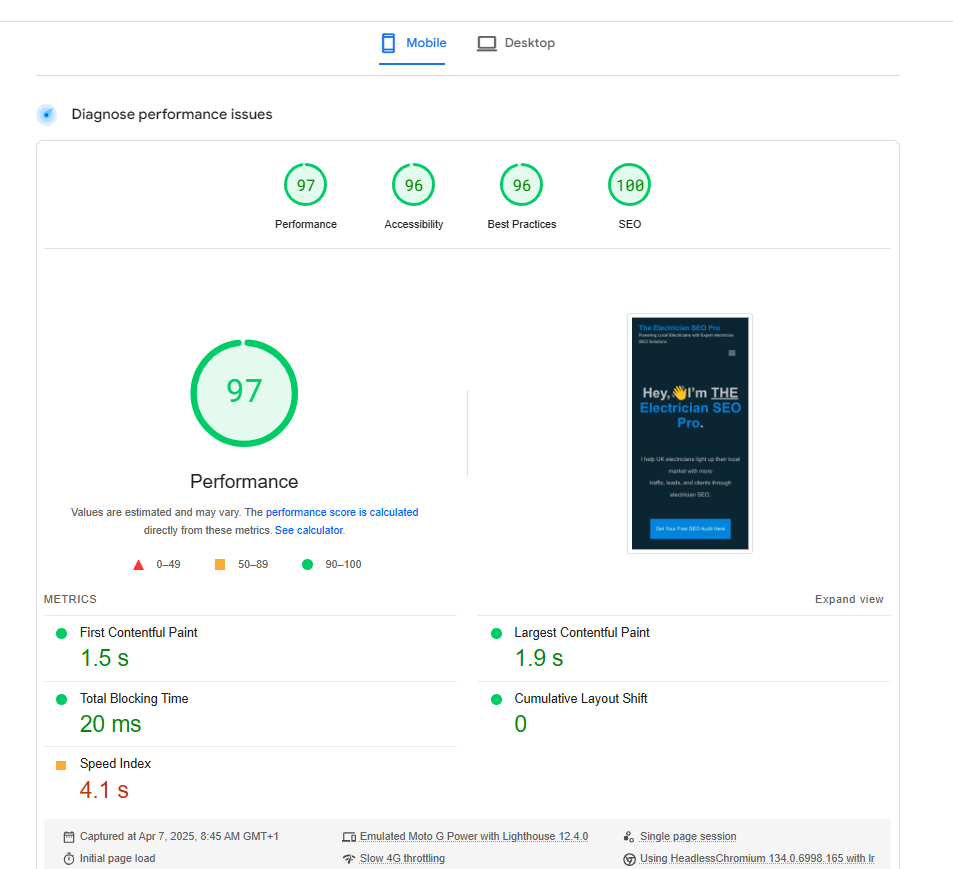
The limit is in the same guide: Google always seeks to show the most relevant content, even if the page experience is sub-par. A lightning-fast site with one vague page about "all electrical work" can still lose to a slower site with a proper EICR page. Speed and phone set-up have their own guide: mobile optimisation for electrical websites.
Relevance comes from the pages you build. So which ones do you need?
What pages does an electrician's website need?
An electrician's website needs a homepage, a separate page for each main service, a page for each town the electrician genuinely covers, an About page, a contact page and somewhere to show reviews and finished jobs. A blog is optional, but useful for answering the questions customers ask before they book. Electrician SEO Pro's rule is one page per service and one job per page, because a single page trying to cover everything gives Google too little to rank and customers too much to wade through.
A one-page website almost always stalls in local search. It squashes rewires, EICRs, EV chargers and emergency call-outs into one address, so none of them gets a proper page. Here's a menu doing it properly, with the main town and the main services one click away:

The list I'd start with:
- Homepage. What you do, where, your number and your best proof.
- Service pages. Rewires, EICRs, consumer units, EV chargers, emergency call-outs. One each.
- Location pages. Only for towns you really work in, never a copy with the town swapped.
- About page. Who you are, how long you've done it, your qualifications.
- Reviews or past jobs. Real photos and real customer comments.
- Contact page. Name, number, email, and your address or service area.
- Blog (optional). Straight answers to the questions customers ask.
How to build a service page properly is in my service page blueprint for electricians, and how to join the pages up is in my guide to internal linking for electricians.
Pages get people through the door. What makes them pick up the phone?
What makes an electrician's website turn visits into calls?
An electrician's website turns visits into calls when the phone number is visible and tap-to-call on every page, the call and quote buttons are big and obvious, any form asks for very little, and the proof sits right next to them: reviews, real job photos and the accreditations the electrician actually holds. Most enquiries happen on a phone, often mid-problem, so every extra tap loses someone. Electrician SEO Pro's rule is to strip out friction: if a customer has to hunt, zoom or copy and paste, the site is costing jobs.
The checklist I'd run on any electrician's site:
- Number up top. Tap-to-call, and still there as people scroll. If customers have to copy and paste your number, you've lost them.
- Big buttons. "Call now" and "Get a quote" front and centre, not tucked in a menu.
- Short forms. Name, number, what the job is. Nobody fills in a 12-field form to book an electrician.
- A "what happens next" line. Tell people when they'll hear back.
- Reviews everywhere. Scattered across the site, not hidden on one testimonials page.
- A hint on price. Even a call-out fee or "from" prices filters out poor-fit enquiries.
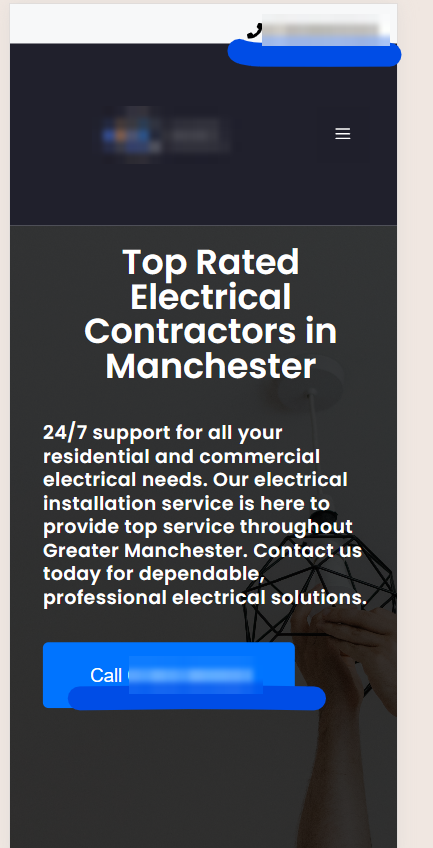
Here's the number done well on a phone, at the top and again on a big Call button:
And proof done well, scheme badges above a five-star review for a real job:

Only show badges you've earned. If you're not registered with a scheme, don't use its logo. More on that kind of trust is in my guide to E-E-A-T for electricians.
Then set up call tracking, or you're guessing which calls the website brought in. My tracking and reporting guide covers how.
All of that can be built on almost any platform. So which one?
Which website builder is best for an electrician?
The best website builder for an electrician who wants to win work from Google is WordPress, in Electrician SEO Pro's view, because it gives full control over pages, web addresses, redirects and SEO settings through plugins such as Yoast. Wix and Squarespace are quicker to set up, include hosting in their plans and handle basics such as canonical tags automatically, but they give less control over the technical details. Any of them can produce a site that ranks: the pages, content and proof matter more than the platform.
How I see the main options:
- WordPress. Free software you put on your own hosting. The most control, a bit more to learn, and a plugin for almost every SEO job.
- Wix. Drag and drop, hosting included. It adds a canonical tag to every page for you, and lets you change it page by page in the Advanced SEO tab.
- Squarespace. Polished templates, hosting included. It adds canonicals for you too, though changing one generally means adding code.
- Google's free Business Profile websites. Gone. Google switched off business.site websites in 2024, so if your profile's website link still points at one, it's pointing at a dead end.
If SEO is how you win your work, I'd move to WordPress, where you get full control. Here's the kind of control I mean. The first thing I do on a new WordPress site is set the permalinks to "Post name", so every page gets a clean address:
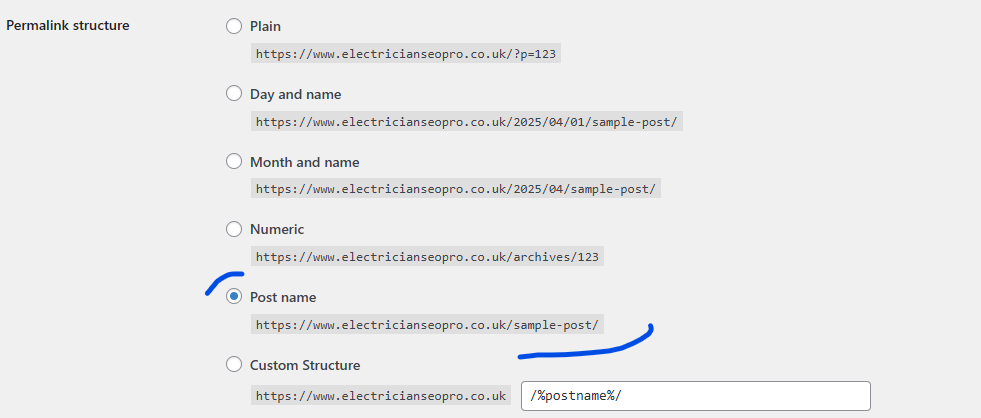
One setting, done in a minute. The full walkthrough is in my guide to URL structure for electrician websites.
Which raises the next question: do it yourself, or pay someone?
Should an electrician build their own website or hire a web designer?
An electrician can build their own website with a builder such as WordPress, Wix or Squarespace if they have the evenings to spare, or hire a web designer, and either can work. A designer saves time and usually gives a more polished result, but a good-looking site isn't automatically a site that ranks. Electrician SEO Pro's advice is the same whoever builds it: you own the domain and the site, every main service gets its own page, the number is tap-to-call and the pages load fast on a phone.
Doing it yourself is fine if you're starting out and money's tight. Themes like GeneratePress give you a mobile-ready setup from the off, though I'd still get a designer and developer to tweak it right.
Hiring someone? Most electricians have never heard of canonical tags, and I'd bet plenty of web designers skip them too. So ask before you pay:
- Will the domain and the website be in my name, and can I take them with me if I leave?
- Can I edit the pages myself?
- Will every main service, and every town I really cover, get its own page?
- Is the phone number tap-to-call on every page?
- How fast are your other sites on a phone? (Run a couple through PageSpeed Insights yourself.)
- If I already have a website, will every old page that matters get a 301 redirect?
If they look blank at question six, keep looking.
No business name yet? Pick it before you buy the domain, because it's far easier when the name and the web address match. There are ideas in my list of electrical company names.
That last question matters most if you're replacing a site that already ranks.
How can an electrician redesign their website without losing rankings?
An electrician can redesign their website without losing rankings by keeping the web addresses of pages that already bring in traffic, keeping the content that makes those pages rank, and setting up a 301 redirect from every old address that does change to its closest new page. Electrician SEO Pro's rule is to list every page and its clicks in Google Search Console before the new site goes live, so nothing that earns calls gets lost in the move.
A redesign is the quickest way to undo years of SEO: new addresses, old pages gone, visitors landing on 404s, and nobody told Google. Here's the order I'd work in:
- List first. In Search Console's Performance report, open the Pages tab and note every page that gets clicks.
- Keep or redirect. Keep those addresses where you can. Where one has to change, 301 it to the closest new page, not the homepage by default.
- Keep the words. Cut a detailed service page down to three lines and a photo, and you've removed the reason it ranked.
- Check after launch. Type a few old addresses into your browser and make sure each one lands on the right new page.
How redirects work, and how to set them up, is in my 301 redirect guide for electricians.
Last bit: the mistakes I see most often.
What website design mistakes should electricians avoid?
The website design mistakes electricians should avoid are a one-page site trying to rank for everything, a phone number that's hard to find or can't be tapped, slow pages weighed down by sliders, pop-ups and plugins, stock photos instead of real jobs, long contact forms, and town pages that are copies with the name swapped. Each one costs rankings, calls or both. Electrician SEO Pro's fix is the same every time: one page per job, the number on every page, real proof and a site that's quick on a phone.
A few more from the pile:
- The phone number as a picture. It looks fine, but nobody can tap it, and it can't be read as text. Type it in as plain text.
- Heavy sliders and pop-ups. Every one is weight. Resist the urge.
- "Cheap" in the headline. People tend to hear it as low quality. Not the first impression you want.
- The site nobody's touched in years. If it looks like a 2009 MySpace page, you've lost them before they've read a word.
Plain. Clear. Fast. That's the whole brief.
Want a hand getting your electrician website found?
You can get a hand getting your electrician website found on Google and turning its visits into calls from Electrician SEO Pro, as part of a full SEO service for your electrical business, or work through the checklists yourself, one page at a time. A well-designed site is only the start: service pages, your Google Business Profile, reviews and links all pull the same way. Whichever route you take, the rule stays the same: one page per job, the number on every page, real proof and fast pages.
If you've got the time, everything you need is in my free SEO for electricians guide. If you'd rather spend your evenings pricing jobs than fiddling with page builders, I can take the SEO off your hands, so the site you've paid for actually gets found and makes the phone ring.
See how I can help, or crack on yourself.
Over to you.