Facebook ads work for electricians when the targeting is local, the offer is clear and every lead gets a fast follow-up. They put an electrician in front of homeowners and landlords while they scroll, before those people start searching, so the leads are less ready to book than Google’s. Electrician SEO Pro’s view is that Facebook suits electricians who start small, at £5 to £10 a day, and use it to warm up local customers alongside Google, not instead of it.
Facebook ads for electricians is a golden lead generator for electricians who know how to use it properly.
The problem? Most don’t.
They throw up a boosted post, target everyone within 50 miles, and then wonder why they get no leads.
This guide fixes that.
It shows you exactly how to run Facebook ads that actually bring in leads, not just likes.
We will cover:
- How Facebook ads actually work for trades
- How to set up the right campaigns for leads, not fluff
- How to target the right people in your service area
- How to avoid common mistakes and wasted spend
Sound good? Let’s get into it.
Why Bother with Facebook Ads as an Electrician? (The Benefits)
Simple: your customers are already scrolling.
Facebook and Instagram give you the chance to appear in front of them before they go looking on Google or Checkatrade.
And it’s not just about being visible. It’s about being hyper-targeted, budget-friendly, and trackable.
Here’s what makes Facebook Ads worth it for electricians:
1. Pinpoint Targeting in Your Local Area
To really win, you need to show up in front of homeowners and landlords in your postcode.
That’s exactly what Facebook Ads let you do.
You can target people by:
- Exact location (postcode, city, or radius)
- Age and homeowner status
- Interests like home improvement or local community groups
- Whether they’ve already visited your website or engaged with your Facebook page
This means you’re not wasting budget on people who live 40 miles away or those just browsing out of boredom.
You’re targeting real potential customers who live nearby, likely need help, and are familiar with local trades.
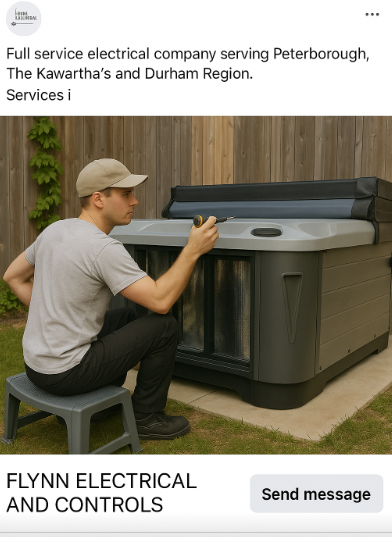
You can also layer this with retargeting ads (people who already clicked but didn’t book), or lookalike audiences (people who behave just like your past customers).
And here’s where the magic really kicks in:
When you combine Facebook’s local targeting with Local Service Ads (LSAs) on Google, you can completely dominate the digital visibility game.
That’s double exposure.
And because both tools allow for geo-fencing, you’re hitting only the people in your service radius.
2. Cost Control at Every Level
One of the biggest benefits of Facebook Ads is that you’re in control of the budget.
You can:
- Set a daily or lifetime spend limit
- Start small (even £5 to £10 a day)
- Scale up only when you’re seeing real leads come in
Whether your goal is to build awareness or generate bookings, you can structure the ad type and spend around that.
And unlike traditional advertising, you’ll never overspend unless you intentionally raise your cap.
Plus, if something’s not working, you can pause it in seconds.
3. Fully Trackable Results
Facebook gives you access to some of the most detailed ad reporting available:
- Where your clicks came from
- What type of person clicked
- Which image, headline, or CTA drove results
- Cost per result, cost per click, click-through rate, and more
You’ll know exactly what’s working and what’s not, so you can cut what’s burning money and double down on what’s bringing in leads.
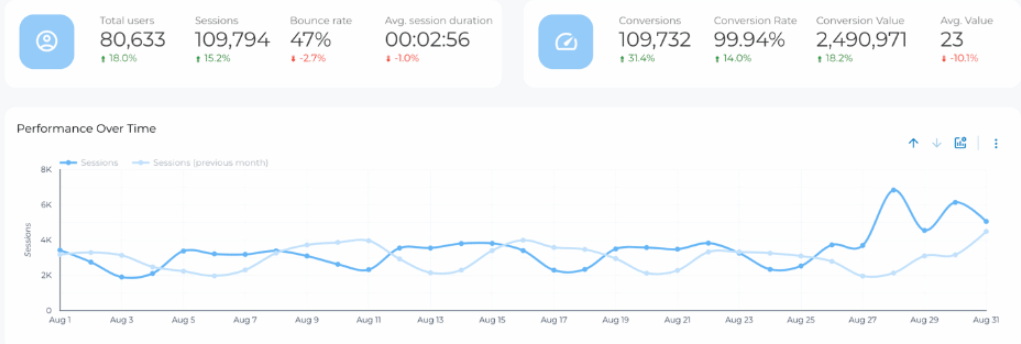
With the right setup (e.g. lead form tracking), you’ll also know how many calls or bookings came from your ads, not just meaningless clicks.
This is where Facebook Ads win over things like flyers or newspaper placements: you don’t just hope they’re working, you know they are.
In my honest opinion, Facebook’s reporting is also a bit more user friendly than Google Ads, though the two do different jobs. More on that later.
4. Full-Funnel Strategy
Facebook doesn’t just help you get leads.
It helps you stay visible before people need you and after they’ve interacted with you.
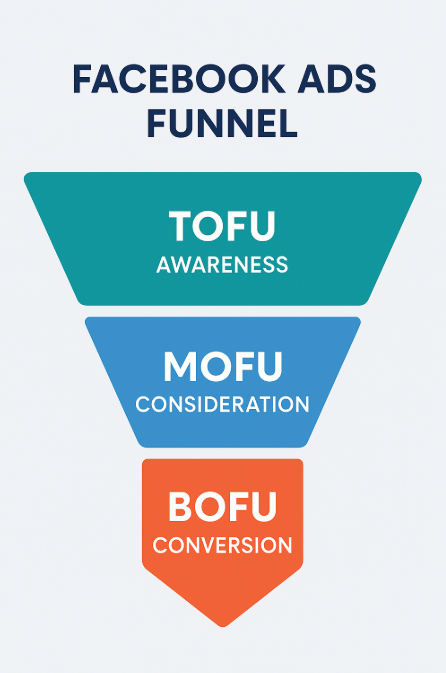
Run top-of-funnel awareness ads to introduce your business, then retarget warm audiences with offers, seasonal promos, or reminders.
(Here’s what a Facebook funnel looks like:)
It’s the only platform where you can build trust, stay top-of-mind, and convert, all in one ecosystem.
Even if someone isn’t ready to book yet, Facebook helps you stay in their orbit so that when they need an electrician, your name’s the one they remember.
Are Meta ads and Facebook ads the same thing for electricians?
For electricians, Meta ads and Facebook ads are effectively the same thing: Meta owns Facebook and Instagram, and one ad platform runs adverts on both, so an electrician sets up, pays for and tracks them in one place. Facebook ads for electricians appear in the Facebook feed, and the same campaign can also show on Instagram. In Electrician SEO Pro’s view, that makes it one channel with one budget, judged on booked jobs rather than likes.
The naming trips people up, so here’s how I’d put it. Meta is the company, Facebook and Instagram are the apps, and the ads for both are bought in the same place. In practice that means:
- One ad platform, not two.
- One budget that can cover both Facebook and Instagram.
- One set of results to judge: cost per lead and booked jobs, not likes.
TikTok ads and YouTube ads are separate platforms with their own accounts, so they don’t share any of that. And posting on your Facebook page for free is a different job from paid ads, which I cover in my social media guide for electricians.
So which formats are worth paying for? Here are the ones that work for electricians.
The Best Facebook Ad Types for Electricians
You don’t need all the bells and whistles. But you do need to know what tools are in the toolbox.
Here are the Facebook ad formats that actually work for electricians, and how to use them like a pro:
Image Ads
Simple, static photo ads that appear in the newsfeed.

These are your bread-and-butter posts for awareness and basic promos.
Use them for:
- Before/after transformations
- On-site team photos
- Announcements (like “10% off this week”)
- Quick wins that don’t need a ton of context
Make sure you:
- Use actual photos from real jobs, skip the stock stuff
- Keep your message short, bold, and readable
- Highlight one clear takeaway (offer, location, or service)
Why it works: people scroll fast. A strong image tied to a problem they’re dealing with (like a faulty fuse box) will make them stop.
Here are the Facebook Ad specifications:
- File type: JPG or PNG.
- Resolution: 1080 x 1080 pixels.
- File size: 30MB.
Video Ads
Video gets attention.
Whether it’s a quick 10-second timelapse of a rewire or a homeowner testimonial, this format helps build trust and showcase how you work.
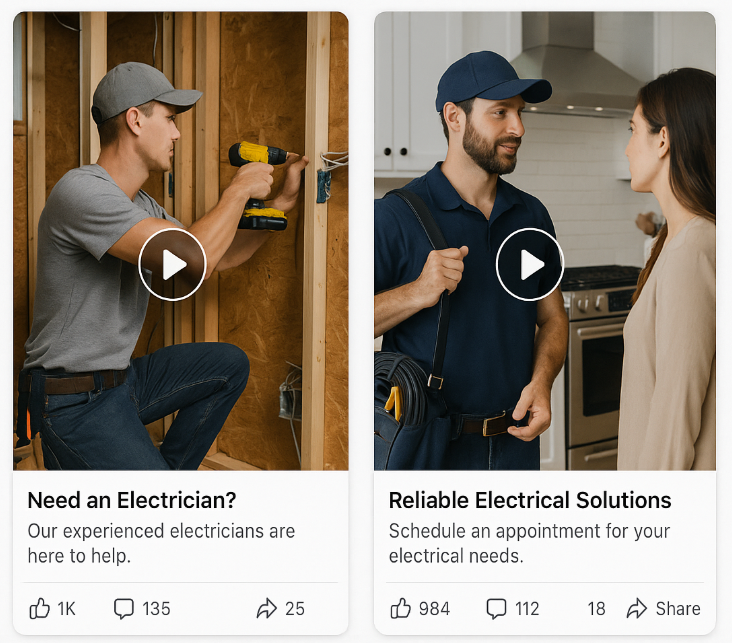
Use video ads to:
- Build credibility with “face-to-camera” intros
- Explain your process visually
- Show off happy clients and clean installs
Best practices:
- Lead with the hook in the first 3 seconds
- Keep videos short (under 15 seconds for max engagement)
- Always include subtitles, most people don’t turn the sound on
- End with a call to action (“Call now” or “Get a quote today”)
Short on footage? In 2026, Meta’s AI tools can stitch a handful of your job photos into a simple video ad inside Ads Manager, so there’s no excuse not to test video any more.
Thinking about running Facebook video ads? Here are the specs:
- Resolution: 1080 x 1080 pixels.
- File type: MP4, MOV, or GIF.
- Video duration: 1 second to 241 minutes.
- File size: 4GB.
Carousel Ads
Swipeable ads that let you showcase multiple services or steps in a job.
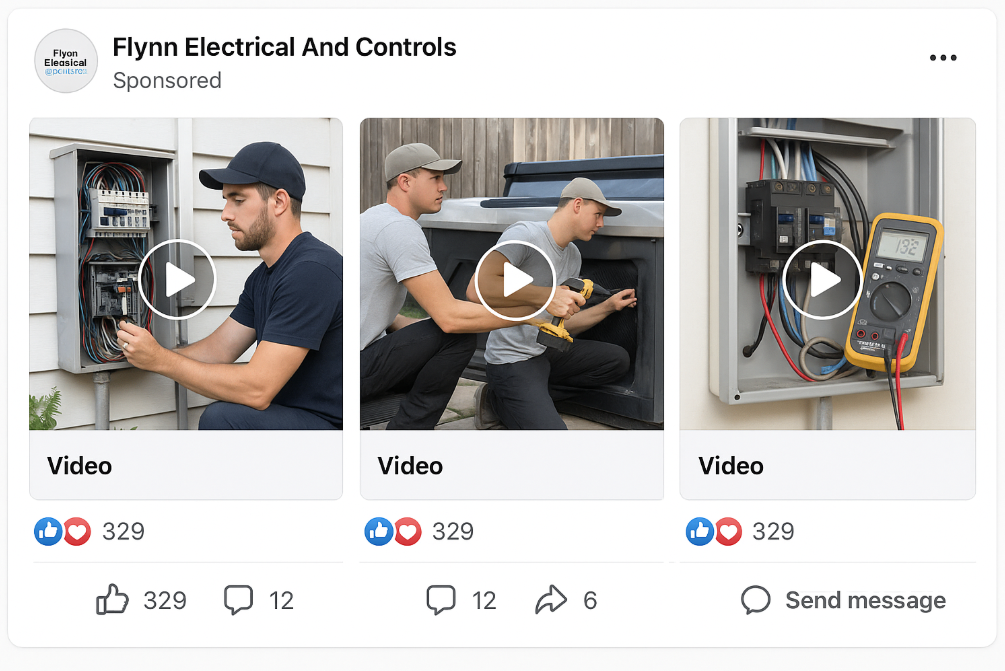
Think of these like a mini brochure built into the newsfeed.
What to use them for:
- Highlighting service categories (e.g. EV charger, lighting, inspections)
- Before-during-after storyboards
- Featuring 5-star reviews or trust signals
Here’s how to do these properly:
- Stick to 3 to 5 cards for best engagement
- Maintain consistent design across cards
- Write unique headlines per card that build a flow
This your choice? Here are the specs:
- Resolution: 1080 x 1080 pixels.
- Video file size: 4GB.
- Image file size: 30MB.
- File types: JPG or PNG for images, and MP4, MOV, or GIF for videos.
- Card number: 2 to 10.
Bonus: you can also test multiple value props in one ad and let Facebook figure out what people engage with most.
Lead Form Ads
These are built for electricians looking to generate quotes and callbacks directly through Facebook.
No website required.

Use them when:
- You want people to book quickly
- You don’t have a high-converting landing page
Tips to boost results:
- Keep the form simple (name, phone, postcode, issue)
- Use Facebook’s pre-fill to reduce friction
- Follow up quickly, these leads are HOT
Why it works: people are lazy. The fewer steps they have to take, the more likely they are to book.
Instant Experience (Canvas) Ads
This is the deluxe option.
Tapping the ad opens a full-screen interactive experience where you can combine video, text, photos, and forms.
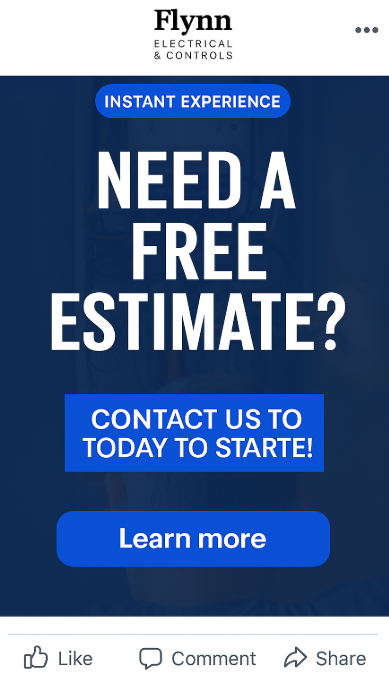
It works well for:
- Educating homeowners on a bigger topic (e.g. rewiring safety)
- Storytelling ads that walk through your process
- Local awareness campaigns with a strong brand push
Execution tips:
- Treat this like a landing page: headline, benefit, visuals, CTA
- Keep the experience fast-loading and thumb-friendly
- Use visual hierarchy, break up info with spacing and buttons
Their supported specifications include:
- Image and video types: JPG or PNG for images. MP4 or MOV for videos.
- Number of images supported: 20 images.
- Size: 1080 x 1920 pixels.
You don’t need to use all these at once.
Start with image or video ads, then layer in lead forms when you’ve got your offer dialled in.
Or use carousel ads to test multiple headlines or services.
The key: pick the format that matches your message.
Keep it local, keep it visual, and always give people a clear next step.
Choosing the Right Facebook Campaign Objective
Your campaign objective is the north star of your ad. It tells Facebook exactly what kind of results you want. Whether you’re aiming for brand exposure, traffic, or direct leads, setting the right objective will determine how your ads are served and who sees them.
Here’s a breakdown of the six campaign objectives electricians can choose from:
1. Awareness
This one’s all about reach. Facebook will push your ad to as many people as possible who are likely to remember it.
Use it for:
- Building brand recognition in your service area
- Getting your name out before launching new services
2. Traffic
Need more eyes on your site or booking page? Choose Traffic. Facebook will show your ad to people most likely to click.
Use it for:
- Promoting a service page or seasonal offer
- Driving visitors to your contact form or quote tool
3. Engagement
This tells Facebook to show your ad to people who tend to like, share, or comment.
Use it for:
- Promoting Facebook posts (e.g. “Before & After” jobs)
- Building social proof and trust with your audience
4. Leads
If you want bookings, phone calls, or filled-out forms, this is the one.
Use it for:
- “Get a Quote” or “Book Now” style campaigns
- Growing your lead list directly inside Facebook (via lead form ads)
5. App Promotion
Not super common for most electricians, but if you’ve got an app for customers to book jobs, use this to drive installs and in-app actions.
6. Sales
This aims your ad at people Facebook thinks are ready to take action, like scheduling a job.
Use it for:
- Targeting high-intent leads
- Retargeting warm audiences who’ve visited your site or clicked other ads
But here’s the thing that’s changed most in 2026, and it affects every one of those objectives:
What Changed in 2026: Advantage+ and Meta AI
If you last ran ads a couple of years ago and you’re coming back to it now, the setup looks different. Here’s what actually matters for an electrician.
Advantage+ is now the default. Meta has merged the old “manual” and “Advantage+” campaign builders into a single flow. When you create a campaign today, AI-driven targeting, placements, and budget are switched on by default. You can still turn the manual controls back on if you want them, but Meta clearly wants the algorithm doing the heavy lifting.
There’s now an Advantage+ option built for leads. This is the big one. Lead generation used to be the bit Meta’s automation more or less ignored. Not any more. Advantage+ leads campaigns have rolled out properly, and Meta’s own testing points to a lower cost per qualified lead versus the old manual setup. For a one-van operation with no time to fiddle with audiences, that’s a genuine win.
The volume problem got easier. The old knock on automation was that it needed loads of conversions before it “learned” anything, which local trades almost never hit. Meta has lowered that threshold, so smaller local budgets now stand a real chance of feeding the algorithm enough data to work with.
AI is creeping into the creative too. Advantage+ can now generate variations of your ads automatically: swapping backgrounds, expanding images to fit different placements, tweaking text, even turning a few photos into a short video. Handy when you’re short on time. One word of warning though: check what it spits out before it goes live. The AI has been known to bolt on backgrounds and props that have nothing to do with your business, so don’t switch it all on and walk away.
My take: test it. Let an Advantage+ leads campaign run with broad targeting and a few different creatives, and see what it does. Keep one manual campaign going for retargeting, where you still want tight control. Then back whichever one brings in cheaper booked jobs. Simple as that.
Right, now let’s talk budgets.
Facebook Ad Budget Options Explained (Without the Jargon)
Before we dive in, here’s a quick note for the confused:
A campaign is your big-picture goal (like getting more bookings). An ad set is a group inside that campaign targeting a specific audience or running at a specific time.
So if you’re running a brand awareness campaign, one ad set might target homeowners in Newcastle, another might target landlords in Middlesbrough.
Now, onto the budgets. Facebook lets you choose where and how your money gets spent, and that flexibility is key to not burning through your wallet.
1. Campaign Budget
This option (you’ll often see it called campaign budget optimisation, and it’s the default under Advantage+) lets Facebook automatically split your total budget across different ad sets within the same campaign, based on performance.
If one ad set is smashing it (e.g. great cost per lead), Facebook will give it more of the budget without you needing to micro-manage.
Best for: letting Facebook’s algorithm do the heavy lifting, especially when all your ad sets are aiming at the same goal.
2. Ad Set Budget
Here, you decide how much each ad set gets. Good if you want tight control over spend, especially if one audience is way larger or different from the other.
Best for: testing multiple audiences or objectives. Say you’re comparing leads from homeowners vs landlords, you might give them separate ad sets with tailored budgets.
3. Daily Budget
This is your “steady drip” option. You tell Facebook how much it can spend per day, and it spreads that out evenly.
Pro: predictable and easy to manage. You won’t wake up to a huge charge. Con: if your audience is small, Facebook might struggle to spend it all.
Use it when: you want consistent exposure day by day, or you’re just testing the waters with a new ad.
4. Lifetime Budget
This sets a total cap on spend over the course of the campaign, and Facebook decides how to allocate it day by day for best performance.
Example: you give it £300 for the month. It might spend £10 one day and £25 the next, depending on what’s working.
Use it when: you have a set timeframe (like a seasonal promo or limited-time offer), or you want Facebook to optimise spend across the duration.
The Best Budget Option:
Pro Tip: start with a small daily budget on 2 to 3 ad sets and let them run for a week. Then check the data. Whichever ad set is converting best? Give it more budget.
That’s how you scale smart, without guessing or overspending.
How Much Do Facebook and Instagram Ads Cost Electricians in the UK?
You can start small, but give it a proper test. These are the figures I work from:
- Facebook ads: £5 to £15 a day to start. As the FAQ below says, £5 to £10 a day is plenty to test audiences, creatives and offers.
- Monthly spend: £100 to £300 a month can go a long way locally, especially if you’re building a name in one or two postcodes.
- Instagram ads: £5 to £15 a day too. They run through the same Meta platform, so they can share a budget with your Facebook ads.
- Cost per lead: around £10 to £30, with busier cities pushing higher.
For comparison, Google Local Services Ads cost £15 to £30 per lead, but those people are searching for an electrician right now. Facebook catches people mid-scroll, so follow up fast and retarget the ones who don’t book.
What matters most is your profit per job, not the cost per lead (the FAQ below has the maths). I’ve put the other channels side by side in my guide to electrical contractor advertising ideas, and the Google side of the costs is in my Google Ads guide.
Facebook Advertising Tips & Best Practices for Electricians
Even with the best tools and a solid budget, Facebook ad campaigns can fall flat if you’re not following smart strategies.
Here’s how to give yourself the best shot at making them work:
1. Invest in Local Awareness Ads
Most electricians operate in clearly defined local areas. That’s your biggest advantage.
Facebook lets you target people within specific postcodes, neighbourhoods, or towns. Use this to zone in on high-intent locals, not random viewers 50 miles away.
Run separate ads for each service area. Tailor the language and offer to match the local vibe. Don’t forget to exclude tourists or temporary visitors, they’re unlikely to become leads.
2. Use Lookalike Audiences to Scale
Lookalike audiences are built from people who already engaged with your business, like past customers, site visitors, or even newsletter subscribers.
Facebook uses these profiles to find similar people who might be interested in your services too. It’s one of the fastest ways to scale a working campaign.
You’ll need the Meta Pixel installed on your website (or a customer list from your CRM or email list). Then you can create a custom audience, and Facebook will spin up a lookalike from it.
Worth knowing in 2026: under Advantage+, Meta’s broad AI targeting often does the job a lookalike used to do, and sometimes beats it. The smart move is to feed it a good custom audience as a starting signal, then let it run and compare against your manual setup.
3. Harness the Power of Remarketing
Who’s more likely to hire an electrician, someone who’s never heard of you, or someone who just visited your contact page?
Exactly.
That’s what remarketing is all about. Facebook lets you re-target people who’ve visited your site, clicked an ad, or filled in a form.
You can show them reminders, testimonials, or even limited-time offers to bring them back and convert.
Don’t have much website traffic yet? No worries, retarget based on ad engagement. Facebook lets you build audiences from people who:
- Watched 50% or more of your video
- Clicked your ad or opened your form
- Liked, commented, or shared your post
These warm leads are gold. Use them.
Just make sure to exclude folks who’ve already booked. You don’t want to burn money showing ads to someone who’s already a customer.
4. Your Visuals Need to Sell, Without Looking Like Ads
Facebook is a visual-first platform. But here’s the trick: the best ads often don’t look like ads.
People scroll past obvious promotions. But a clean, eye-catching photo of your team on the job, or a video showing a quick electrical fix? That gets clicks.
Try using:
- Behind-the-scenes footage
- Before & after transformations
- Team profiles or short testimonials
And make sure your videos have subtitles. Most users watch with the sound off.
5. Choose the Right Bidding Strategy
Facebook ads work on an auction model. You’re bidding for space in people’s feeds, against other electricians, local plumbers, even big retail brands.
You can choose different bid strategies:
- Highest Volume: get as many results as possible for your budget
- Cost-per-Result Goal: Facebook sticks to your max cost per lead
- Bid Cap: you set a ceiling on what you’re willing to pay per result
Most electricians just starting out should go with Highest Volume or Cost-per-Result.
Watch your numbers for a week or two. Then adjust your bidding strategy based on which campaign gets the most leads for the lowest cost.
6. Install the Meta Pixel (Seriously)
If you’re not tracking what’s working, you’re guessing. And that’s expensive.
The Meta Pixel is a small bit of code you add to your website. It tracks what people do after clicking your ads, like visiting your booking page or submitting a quote form.
This data powers everything from audience building to conversion tracking. Without it, your Facebook ad strategy is flying blind.
Heads up for 2026: Meta changed how it counts conversions earlier this year. Video view conversions can now look higher, and image conversions can look lower, than they did before. So if your numbers suddenly shift, check your attribution settings before you panic. And pair the Pixel with Facebook’s Conversions API, it matters more than ever for keeping your data accurate.
7. Run Video Ads (Even Short Ones)
Video is still king. Short clips in particular punch well above their weight, and Reels keep eating more of the feed every year.
Keep your videos under 15 seconds, show your face or a service in action, and include subtitles.
Whether it’s a “day in the life of an electrician” or a customer showing off their new lighting install, authenticity wins.
And don’t forget: rotate your creatives regularly. Even the best ad goes stale fast. Try new visuals, new angles, and new hooks every couple of weeks.
8. Match Your Landing Page to the Ad
Don’t promise one thing in your ad, then deliver something totally different on your landing page.
If your ad says “£50 Off Electrical Safety Inspections,” your landing page should only talk about that offer. Not your entire list of services.
Make the call-to-action obvious. Use social proof. Include a contact form or a tap-to-call button. And keep everything mobile-friendly, because that’s where most of your leads will come from.
Want to level up even more? Follow up with leads via email or SMS once they fill out your form. A well-timed reminder can turn a maybe into a yes.
9. Tighten Up Your Ad Copy
Your visual stops the scroll. Your copy seals the deal.
Avoid fluff. Get straight to the point. Focus on the benefit to the homeowner (not just what you do).
For example, instead of: “We’re experts in consumer unit upgrades.” Try: “Outdated fuse box? We’ll upgrade it in 1 day, no mess, no hassle.”
And test, test, test. Don’t fall in love with the first draft. Try different headlines, calls-to-action, and formats until something sticks.
10. Test More Than Just Headlines
A/B testing isn’t just for copy. Test multiple versions of:
- Visuals (photos vs graphics vs video)
- Offers (free quote vs £25 discount)
- Formats (carousel vs single image vs instant experience)
The goal?
Find the combo that gets you the most leads for the least spend.
Let the data guide you.
Which jobs should electricians advertise on Facebook?
Electricians should advertise planned jobs on Facebook, such as consumer unit upgrades, safety inspections, rewires and EV charger installs, because Facebook reaches homeowners who are open to hiring an electrician but aren’t searching yet. Emergency call-outs usually suit Google better, since people in a hurry are already searching. Electrician SEO Pro’s view is that the offer should match the job and the season, with one clear offer per ad rather than a list of everything an electrician does.
Someone scrolling on the sofa isn’t thinking about their fuse box. But they might say yes to a free inspection or a quote on a consumer unit, so make the offer fit the job:
- Planned work: consumer unit upgrades, safety inspections, rewires, EV charger installs. A before-and-after photo plus a clear offer, like “Free Fuse Box Inspection”, does the job.
- Seasonal hooks: safety checks before winter, rewiring in spring, EV charger installs in summer.
- Emergency work: you can run an emergency ad on Facebook, like the “Power Out? We’re On Our Way” example below, but Google is where people are searching right now. My Google Ads guide for electricians covers that side.
Keep it to one job per ad. The moment an ad lists everything an electrician does, it stops saying anything.
Here are three example ads to show what that looks like.
Facebook Ad Swipe Examples (With Commentary)
Sometimes the best way to learn what works (and what doesn’t) is by looking at real-world examples. Below are three anonymised or mocked-up electrician Facebook Ads, broken down with commentary.
Example 1: “No Callout Fee This Week Only”
Visual: a clean, high-quality image of a smiling electrician holding a clipboard, standing next to a van branded with company colours.
Headline: “No Callout Fee, Book This Week Only!”
Body Copy: “Need a local electrician? We’re offering no callout charges if you book by Friday. Tap below to grab your slot.”
CTA: Book Now
What works:
- Urgency with a time-sensitive offer.
- Simple, jargon-free messaging.
- Visual reinforces professionalism and approachability.
Here is the full visual of this:

Example 2: “Electrical Rewiring? Get a Free Quote”
Visual: before-and-after photo of an outdated fuse board versus a sleek new consumer unit.
Headline: “Electrical Rewiring? We’ll Quote You for Free”
Body Copy: “Old electrics putting your home at risk? Get peace of mind with a free quote from a NICEIC-approved electrician. Book a visit today.”
CTA: Get Free Quote
What works:
- Great use of visual transformation, which makes the benefit tangible.
- Leverages authority (“NICEIC-approved”).
Here is the full visual of this:

Example 3: “Fuse Tripping? We’ll Be There in 90 Mins”
Visual: emergency-style image, a dark hallway with a flashlight illuminating a circuit box.
Headline: “Power Out? We’re On Our Way”
Body Copy: “Don’t wait days for help. Our emergency electricians can be there within 90 minutes. 24/7 service. Call now.”
CTA: Call Now
What works:
- High urgency and emotional appeal. It solves a stressful problem fast.
- Emphasises fast response and 24/7 availability.
Here is the full visual of this:

Troubleshooting: Why Aren’t My Facebook Ads Working?
Already tried Facebook Ads and got nothing but crickets? You’re not alone.
Plenty of electricians waste money on campaigns that don’t convert. But instead of blaming the platform, it’s usually down to a few fixable issues.
Let’s walk through the most common reasons your Facebook ads might be flopping, and what to do about it:
1. Poor Targeting
You’re either going too broad (“everyone within 50 miles”) or targeting the wrong interests altogether. For example, targeting general “home improvement” interests might miss people actively needing electrical work. Tighten your location targeting, use homeowner-relevant demographics, and layer in behaviours (like recent movers or DIY interest) to sharpen the aim.
2. Wrong Campaign Objective
Choosing the wrong goal, like “Traffic” instead of “Leads,” can tank performance. If you want quotes or jobs, your objective needs to be conversion-based, not just getting people to visit your site.
3. Weak Visuals and Copy
Blurry stock photos or overly wordy ads don’t stop the scroll. Use real project photos. Keep the copy simple, benefits-focused, and local (“Same-week EICRs across Manchester” is better than “We offer electrical services”).
4. Too Much Text on Your Image
The old hard rule that auto-rejected image ads with more than 20% text is gone now. But don’t celebrate too hard: Meta’s delivery system still quietly throttles text-heavy images, so they reach fewer people for the same money. Keep the text on the image short and punchy, and let your caption and headline do the talking.
5. No Follow-Up System
You got leads, but did you call them within 10 minutes? Follow-up delays kill conversions. Have a system in place, automated texts, fast call-backs, even CRM reminders, to strike while the lead’s still hot.
6. No Retargeting
Only a fraction of visitors will convert on the first click. If you’re not retargeting those warm visitors with follow-up ads (“Still need a quote?” or “Book your safety check today”), you’re leaving money on the table.
7. No A/B Testing
If you’re running one ad and praying it works, that’s not strategy, that’s gambling. Always test variations: different headlines, images, CTAs, and formats. Even small changes can double your click-through rate.
8. Pixel Not Installed or Working
If your Meta Pixel isn’t tracking properly, Facebook can’t optimise. This means your ads get shown to the wrong people, and you don’t get accurate cost-per-lead data. Install the Pixel correctly and test it using Facebook’s Events Manager.
9. Offer Isn’t Strong Enough
“Need an electrician? Call us” is not an offer. “No Callout Fee This Week” or “Free Fuse Box Inspection” is. You need a hook. Make people a clear promise and give them a reason to click now.
Fixing just one or two of these can completely turn a failing campaign around. So before you throw more money at your ads, double-check your setup, and keep testing until it clicks.
CTA & Follow-Up: What To Do With Leads After They Come In
Getting leads is only half the battle. What you do immediately after they land in your inbox or CRM can make or break the campaign’s true ROI.
Here’s how to make sure those leads don’t slip through the cracks:
- Follow up within 5 minutes. The faster you respond, the more likely you are to close the job. Wait an hour? They’ve probably already called someone else.
- Don’t rely on email. Use a phone call or SMS. People read texts far more reliably than emails, and a quick call can often seal the deal on the spot.
- Use a CRM or tracking sheet. You don’t need fancy tech, Google Sheets will do. But have a place to log:
- Date the lead came in
- Whether you followed up
- What the result was (Booked? Ghosted? Told you to follow up later?)
- Automate if possible. Tools like Jobber, ServiceTitan, or even Zapier automations can trigger texts or assign tasks as soon as a form is filled out.
- Nurture unconverted leads. Someone didn’t book today? Doesn’t mean they won’t next week. Add them to your email list, or retarget them with follow-up Facebook ads to stay top of mind.
In short: the real money is in the follow-up. If you’re paying to get leads, make sure your system to close them is just as sharp.
Facebook Ads vs Google Ads vs Checkatrade: Which Is Better?
Electricians often ask, “Which is the best platform to get more leads?”
Here’s a simple comparison table to help you decide:
| Platform | Lead Quality | Long-Term ROI |
|---|---|---|
| Facebook Ads | Warm/Cold | Medium |
| Google Ads | Hot | High |
| Checkatrade | Cold | Low |
Best Use:
- Facebook Ads: great for generating awareness and attracting local homeowners who may not be actively searching but are open to hiring.
- Google Ads: best for targeting people who are already looking to hire an electrician now.
- Checkatrade: works better for those who rely on directory-style trust, but competition is high and lead quality can be poor.
Use this chart to guide where you spend based on what your business needs most: fast leads, brand awareness, or long-term pipeline building.
Ready to test? Try one, track it, then scale the winner.
What is the simplest way for an electrician to start with Facebook ads?
The simplest way for an electrician to start with Facebook ads is to run one Leads campaign aimed at one local area, with a real job photo, one clear offer, the Meta Pixel installed and a small daily budget of £5 to £10. Leave it for a week, check which ad set converts best, then give that one more budget. Electrician SEO Pro’s rule is that the ad is only half the job: every lead needs a call or text back within minutes.
Here’s the order I’d do it in:
- Pick the Leads objective. Traffic gets you visitors, not quotes.
- Aim at one local area (postcode, town or radius), not everyone within 50 miles.
- Use a real photo or short video from a job, plus one clear offer such as a free quote.
- Send clicks to a landing page that matches the ad, or use a lead form ad if you haven’t got one. Keep the form to name, phone, postcode and issue.
- Install the Meta Pixel, so Facebook can see what people do after they click.
- Leave it a week at £5 to £10 a day, then move more budget to the ad set that’s converting best.
- Ring or text every lead back fast.
That’s the lot. Lookalikes and the other scaling tricks can wait until something’s working. Skip the follow-up, though, and you’ve paid for leads you never answered.
Got a specific question? Here are the common ones, answered quick.
FAQ
Do Facebook Ads work for electricians?
Yes, if done right. Facebook Ads are one of the most cost-effective ways to get your name in front of local homeowners. The key is smart targeting, compelling visuals, and having a clear offer. When you combine that with a strong follow-up process, Facebook Ads can generate consistent, high-quality leads.
How much should I spend on Facebook Ads as an electrician?
Start small, £5 to £10 a day is enough to test audiences, creatives, and offers. Once you find what’s working, you can scale. Make sure your cost-per-lead doesn’t exceed the average profit you make from a new job. It’s all about return, not spend.
Are Facebook Ads better than Checkatrade or local directories?
In most cases, yes. Checkatrade charges ongoing fees and sends leads to multiple businesses. With Facebook Ads, you control the message, audience, and follow-up, and only your business is front and centre.
Can I run Facebook Ads without a website?
Absolutely. You can use Facebook’s lead form ads to collect names, numbers, and service requests directly on the platform. It’s a fast, no-fuss way to get started. That said, having a solid website boosts credibility and conversions.
What’s a good cost per lead for electricians on Facebook?
It varies by region and competition, and it’s crept up over the last couple of years as more businesses pile onto the platform. As a rough guide, expect somewhere around £10 to £30 per lead, with busier cities pushing higher. The number that actually matters is the maths: if your profit per job is £100+, even a £30 lead can pay for itself several times over, as long as you’re closing them.
Boosted post or proper ad campaign: which is better?
Boosted posts are fine for getting likes or engagement, but they’re not built for lead generation. A proper ad campaign gives you more control, better targeting, and access to lead forms and conversion tracking. If you want real leads, don’t boost, build a campaign.
How long until I see results?
You can get leads within 24 to 72 hours if your targeting, creative, and offer are dialled in. But most campaigns take 1 to 2 weeks to optimise. Give Facebook time to learn and adapt before making big changes.
What kind of Facebook ad is best for electricians?
Lead form ads work great because they let homeowners request a quote without ever leaving Facebook. Combine that with compelling imagery and a clear offer (like “Free Electrical Inspection” or “10% Off First Callout”) to boost response.
Should I run Facebook Ads all year round?
If your budget allows it, yes. But you can also rotate campaigns seasonally, e.g. safety checks before winter, rewiring in spring, EV charger installs in summer. Tying offers to seasonal needs keeps them relevant and drives urgency.
Can Facebook Ads help with commercial electrical leads?
They can, but it’s harder. Commercial buyers tend to research more, and Facebook is more B2C. To reach B2B clients, try pairing Facebook with LinkedIn Ads or Google Search campaigns targeting commercial terms.
How do I know my Facebook ads are actually working?
Track every lead. Use call tracking, lead forms, CRM tagging, whatever works. The goal isn’t clicks or likes, it’s booked jobs. If you’re not getting quote requests or calls, something needs fixing, whether it’s your ad, offer, or landing page.
Over to You
Running Facebook Ads isn’t about luck. It’s about strategy.
This guide has shown you what it actually takes to build a profitable Facebook Ads campaign as an electrician, from choosing the right ad type and budget to writing copy that converts and following up fast.
Here’s the quick recap:
- Nail your targeting, local, specific, and relevant to homeowners.
- Choose the right campaign objective based on your actual goal (leads, traffic, awareness).
- Lean on Advantage+ and let Meta’s AI do the heavy lifting, but keep an eye on what it’s doing.
- Test different images, headlines, and CTAs.
- Don’t just collect leads, convert them with a fast, human follow-up.
- Use retargeting and remarketing to catch those who didn’t convert the first time.
Most campaigns fail not because Facebook doesn’t work, but because they’re missing the key pieces above. Now you’ve got them.
So the next step?
Test it. Tweak it. Rinse and repeat.
And if you want someone to do it for you, someone who understands the trade, doesn’t speak in fluff, and is obsessed with getting local electricians real results, you know where to find me.