

Tracking & reporting for electrician SEO
You can’t improve what you don’t measure, but you can absolutely drown in numbers that don’t matter. This stage is about watching the handful of metrics that actually mean something for a local electrician, and quietly ignoring the rest.
Signal versus noise
Plenty of agencies will hook up the tracking, build you a slick dashboard, and then bury you in graphs that look impressive and tell you almost nothing. Bounce rate this, sessions that, a line going up and to the right with no explanation of whether it put a single job in your diary. It’s a clever way to look busy while dodging the only question that counts.
The honest version is simpler, and a bit less glamorous. There are really only a few numbers worth your attention as a local electrician, and the skill is knowing which ones are signal and which are just noise dressed up to fill a report. So before we get to the tools, it helps to understand the two types of metric you’re actually looking at.
Leading metrics versus lagging metrics
Leading metrics are the things you (or I) control directly: how many pages have gone live this month, how many relevant links have been earned, how many fresh reviews have come in. They should tick up steadily, and they’re your early reassurance that the work is genuinely being done, long before the rankings move. If the leading metrics are flat, something’s wrong regardless of what the rest of the dashboard says.
Lagging metrics are the payoff: impressions, clicks, rankings, phone calls. The catch, and the reason SEO tests everyone’s patience, is that today’s lagging numbers are the result of work done weeks or months ago. So you watch the leading metrics to know the engine is running, and the lagging ones to see how fast you’re now going. Expecting the lagging numbers to jump the week after you start is the single most common reason people give up far too early.
Your Google Business Profile insights
For a local electrician, your Google Business Profile is often the most telling place to look, because it sits closest to the actual phone call. Inside it you can see the calls it has generated, the direction requests, the clicks through to your website, and, most usefully of all, the real searches people typed to find you in the first place. That last one is gold, it tells you which services and which towns are actually pulling people in.
Watch how those trend across the months rather than refreshing them every morning, and remember that changes you make to the profile can take a little while to feed through to the numbers. It’s a barometer, not a stopwatch. I show exactly where to find these numbers, step by step, in my guide on how to track GBP success.
Search Console and Analytics: the free heavy lifters
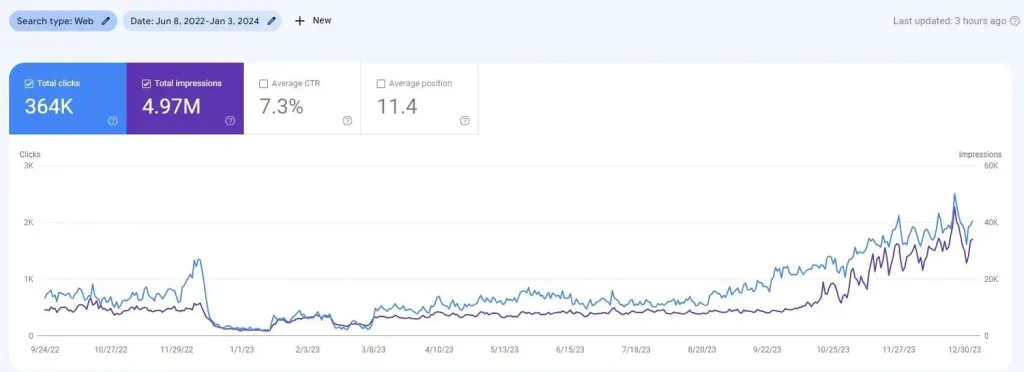
Beyond the profile, two free Google tools do most of the real work. Google Search Console shows you what you actually rank for, which queries are bringing impressions and clicks, and, brilliantly, where you’re sitting just off the bottom of page one, those near-misses are usually your easiest wins. It’s also where you keep an eye on your Core Web Vitals and catch any indexing problems early.
Google Analytics 4 picks up where Search Console stops. It tracks your website traffic, your form submissions and your phone-number taps, and, used properly, it reveals which marketing channels are sending you paying customers rather than just clicks. That distinction matters enormously: a channel can pour traffic onto your site and still be quietly useless, and a smaller channel can be doing all the real work. Without this, you’re guessing.
You don’t have to do all this yourself.
Reading it is one thing; doing it properly, month after month, is another. Hand it over and you can get back to what you’re brilliant at, the actual electrical work, and get your evenings back.
Closing the loop on calls and forms
The piece that ties it all together is knowing where your actual enquiries came from. Call tracking, whether through a dedicated tracking number or the call data inside your profile and Analytics, tells you how many calls your SEO is genuinely driving, not just how many clicks. Tag your contact form the same way and you do it for enquiries too. That’s the difference between reporting “traffic went up 30%” and reporting “you got eleven new job enquiries from Google this month”, and only one of those sentences means anything when you’re deciding whether this is worth the money.
The one number that actually matters
Here’s the thing, and it’s the same message that runs through this entire system. You can measure every metric going, and there’s a place for all of them, but what you should really care about is dead simple: how many leads you’re getting each month. Impressions are nice. Rankings feel good. Neither of them pays your wages. If the leads are climbing, the campaign is working; if they’re not, no dashboard in the world makes up for it.
That’s the number I report on first, in plain English, and it’s the number the whole guarantee is built around. Everything else, the leading metrics, the Search Console graphs, the GBP insights, exists to explain that one figure and show you why it’s moving. Keep your eye on it and you’ll never be fooled by a pretty report again.
Setting all this up cleanly, and then reading it honestly each month, is its own job on top of the actual SEO. It’s built into every campaign I run, reported in plain English, no vanity graphs. Message me on WhatsApp.
Want the leads without living in the dashboards?
It’s all here, free, for you to run yourself. But it’s a lot to stay on top of, so if you’d rather just get the leads, I’ll take the whole lot off your plate.
You’ve got the full playbook. Want it done for you instead?
Everything you need to run this yourself is right here, free. But if you’d rather spend your days on the tools and your evenings off, send me a WhatsApp and I’ll run the lot, leads in 90 days or the next 90 are on me.