

Mobile optimisation for an electrician's website means making the site load quickly, read clearly and work easily on a phone, and it is a ranking signal, because Google uses the mobile version of your pages for indexing and ranking. Electrician SEO Pro's rule for electricians is that the phone number is visible and tappable on every page, and that nothing on the phone version is hidden or missing compared with the desktop one.
How does mobile optimisation work for an electrician's website?
Mobile optimisation works for an electrician's website through responsive design, which adapts the same pages to any screen: text resizes, images scale down and the menu collapses into a tap-friendly button, while the pages load quickly on a mobile connection. Because Google indexes the mobile version of a site, the phone version is the one that counts. Electrician SEO Pro's rule is to treat the phone version as the main site.
Mobile optimisation isn't just a site that loads. It looks good, fits the screen properly, is easy to tap around and doesn't take 12 years to load over 4G or 5G. In practice:
- Text resizes to fit the screen.
- Images shrink instead of spilling off the edge.
- Menus collapse into a simple button you can hit with a thumb.
For your visitors, that means no rage-quitting to a competitor.
Here's a good example, the case studies page on an electrical contractor's site. On a desktop it's a grid:

On a phone it flows into a single scrollable stack:

Each layout suits its own screen. That's responsive design doing its job. Building or rebuilding the whole site? Start with my guide to electrician website design.
That's the how. But does it affect where you rank?
Is mobile optimisation a ranking signal for electricians?
Yes, mobile optimisation is a ranking signal for electricians, because Google uses the mobile version of a site's content for indexing and ranking, and its ranking systems use Core Web Vitals, which measure how fast and stable a page feels. Electrician SEO Pro treats a broken phone site as a ranking problem, with one plain limit: a fast mobile site won't beat a more relevant page on its own, so it works alongside good content, not instead of it.
Both of those points come from Google itself. Its mobile-first indexing guide says Google uses the mobile version of a site's content, crawled with the smartphone agent, for indexing and ranking. Its page experience guide says Core Web Vitals are used by its ranking systems, and also that Google always seeks to show the most relevant content, even if the page experience is sub-par.
So what does that mean for an electrician? If your phone version has less on it than your desktop version, Google can't get as much information from your page, and the guide warns of traffic loss when mobile content is cut back. Keep the same content, the same headings, and the same title and meta description on both. And don't hide your main content behind taps or swipes, because Google won't load content that needs a user interaction.
Ranking is only half of it, though. What about the customer?
Why does mobile matter for an electrician's customers?
Mobile matters for an electrician's customers because many of them search on a phone, often in a hurry, and will ring whichever electrician is easiest to contact. A site that is slow, cramped or hides the phone number hands that job to the next result. Electrician SEO Pro's rule is that a customer should be able to find your number and tap it within seconds of landing.
Think about someone searching for an emergency electrician. Are they sat at a desktop with a cuppa? No. They're on their phone, probably in a panic, quite possibly standing in the kitchen with the lights out. If your site is hard to use, they're gone in seconds, and you've handed the job to a competitor.
It's a trust thing too. A slow, messy site with tiny text and broken layouts screams "unprofessional". A clean, smooth one says you're switched on, and someone they can let into their home.
So what does a mobile-friendly electrician site actually need?
What makes an electrician's website mobile-friendly?
What makes an electrician's website mobile-friendly is a handful of basics: responsive design, fast loading, short scannable text, a tap-to-call phone number, simple navigation and no popups that block the screen. Electrician SEO Pro's rule is to remove friction: if a customer has to pinch, zoom, hunt or copy and paste, the site has failed.
Here's the checklist:
- Short, scannable text. Walls of text kill engagement on a small screen. Use short paragraphs, subheadings and bullet points for your services.
- Contact details up front. Put your "Call Now" button, service areas and emergency availability front and centre, and keep them there as people scroll. The site should say: I'm local, I'm available, here's how to reach me.
- Tap-to-call. A sticky header or footer with a click-to-call number, a services button and directions. If customers have to copy and paste your number, you've lost them, because they just won't do it.
- Simple navigation. No tiny dropdowns and no 15-item mega menus. Use a collapsible menu that's easy to tap, text of at least 16px and buttons spaced for a thumb.
- No clutter. No full-screen popups, no autoplay videos, no cookie banners with no exit. Make everything easy to close. Ask only for a name, a phone number and a job description, because nobody wants to type their life story on a phone.
- Light images and video. Compress and resize photos (don't load 4000px-wide ones on a phone), lazy load the ones further down the page, and never autoplay video with sound. Describe your images properly too, which my guide to alt text for electrical websites covers.
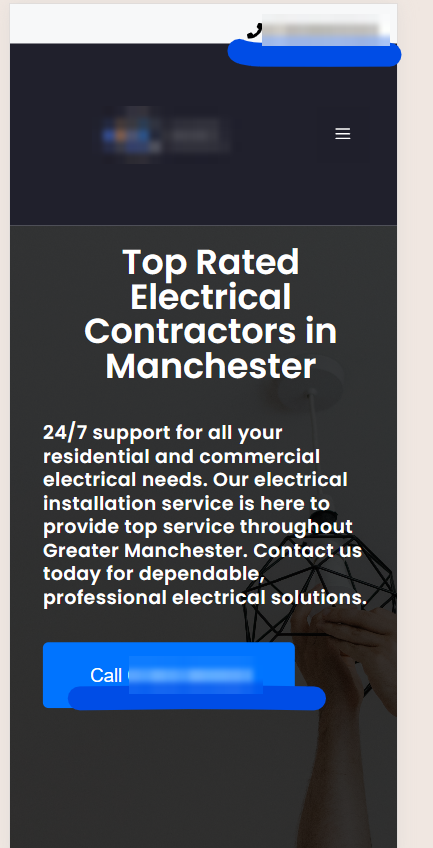
Here's the tap-to-call idea on a phone, with the number shown at the top of the screen and again on a button:
Next up: speed. Phone visitors are impatient. Everyone with an internet connection is, me included.
How fast should an electrician's website load on a phone?
An electrician's website should load its main content within 2.5 seconds on a phone, respond to taps in under 200 milliseconds and keep its layout steady, which are the good targets for Core Web Vitals. Electrician SEO Pro's rule is to aim for those, then test on a real phone, because a good score on a screen doesn't help if the phone number is hidden.
Those targets come from Google's Core Web Vitals guide. In plain English:
- Largest Contentful Paint: when your main content appears, within 2.5 seconds.
- Interaction to Next Paint: how quickly the page responds when someone taps, under 200 milliseconds.
- Cumulative Layout Shift: how much the page jumps around while it loads, below 0.1.
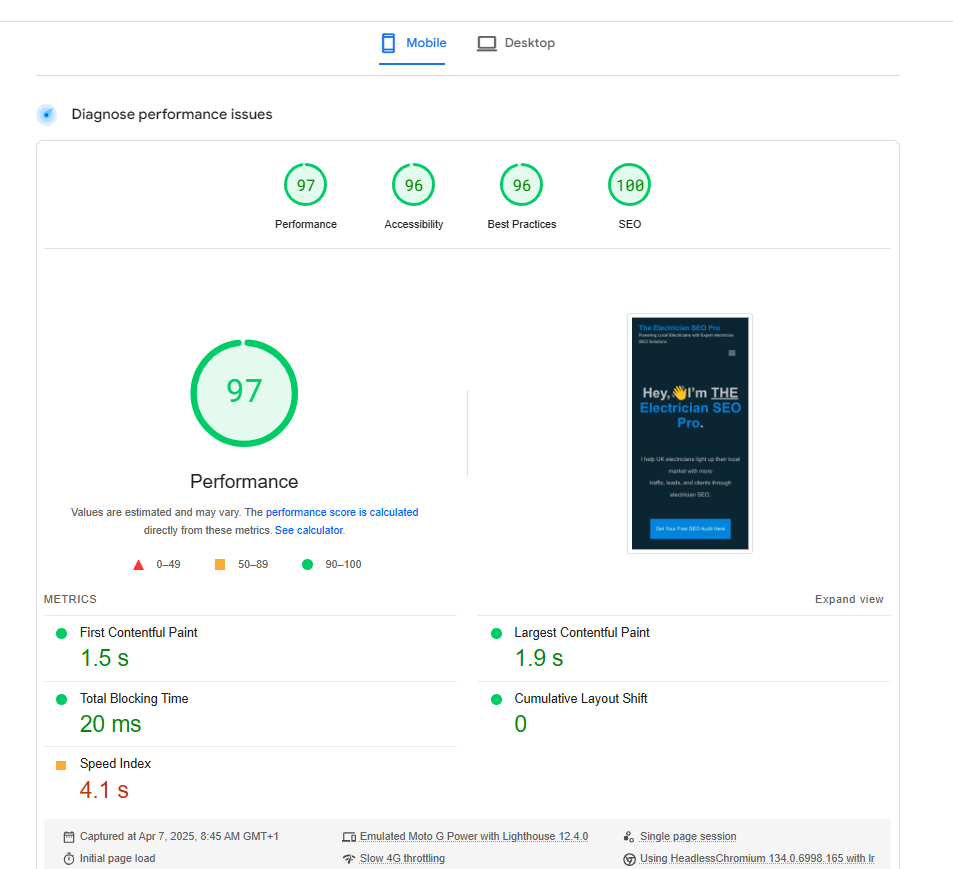
Here's a PageSpeed Insights mobile result for my own site, captured in April 2025. It's the kind of result to aim for:
Slow pages lose leads, plain and simple. Targets are one thing, though. How do you test your own site?
How can an electrician test their website on mobile?
An electrician can test their website on mobile by running the address through PageSpeed Insights on its Mobile tab, then opening the site on a real phone and trying what a customer would try. Electrician SEO Pro's rule is to trust what a customer would see over any score, and to test one page of each type, such as the homepage and a service page.
Google's standalone Mobile-Friendly Test was retired in 2023, so ignore any older advice that sends you there. Here's what to do instead:
- Run PageSpeed Insights. Pop in your website address and hit "Analyse", and make sure you're on the Mobile tab, not Desktop. Ignore the score for now. Scroll down to the list of issues it flags, because that's where the gold is. Most of it looks like nerdy tech jargon, so go for the quick wins: oversized images, and heavy scripts from bulky plugins or slow themes.
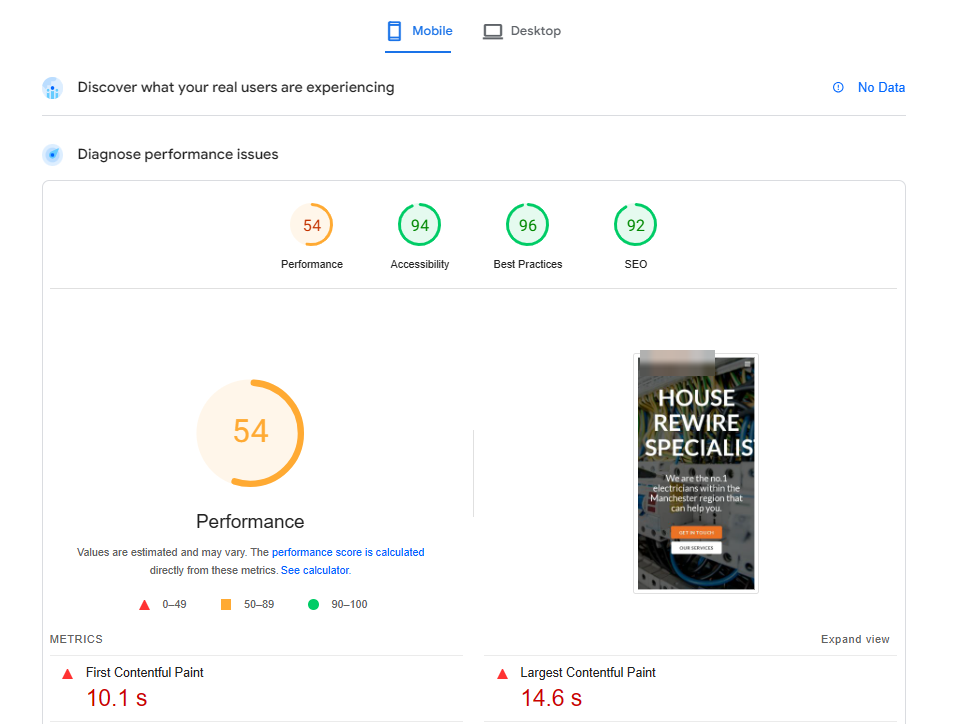
- Test on your own phone. No fancy simulators, just grab your phone and pretend you're a customer. Does it load quickly on mobile data? Can you read everything without zooming? Is your phone number visible straight away? Can you tap the menu and reach the key pages? Are the buttons spaced out and easy to press? If something annoys you, it'll annoy your visitors too.
- See what Google sees. In Search Console, paste a page into the URL Inspection tool, run a live test and view the tested page. You get a screenshot of the page as Google renders it, a quick check that nothing important is missing.
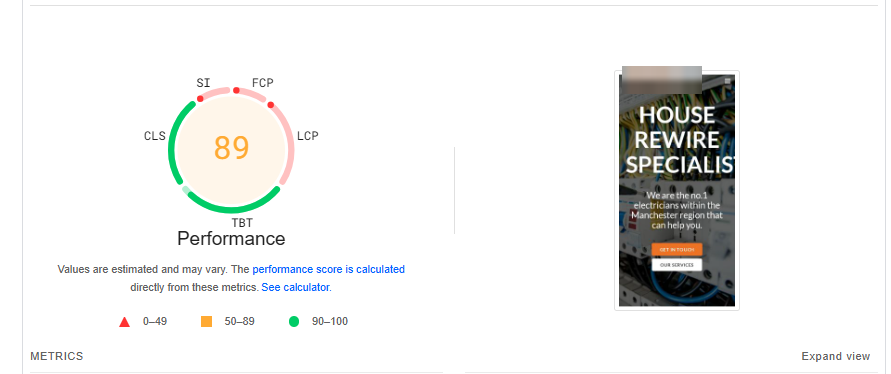
- Test again after your fixes. Run PageSpeed Insights once more and look for fewer red flags. Here's the same Manchester site on a later run:
Found problems? Here's how to fix the speed ones.
How do electricians speed up their website on mobile?
Electricians speed up their website on mobile by compressing and resizing images, removing plugins and scripts they don't need, switching on caching and using decent hosting, and on WordPress an optimisation plugin handles much of it. Electrician SEO Pro's rule is to start with the images, because oversized photos are one of the biggest causes of slow phone pages.
Here's the order I'd work in:
- Compress your images. Squeeze them with a tool like TinyPNG or Squoosh before you upload, or use the WebP format. Already uploaded? A plugin like Smush or ShortPixel can compress the ones already on your site.
- Remove bloat. Ditch plugins and scripts you don't use.
- Switch on caching. Most hosts can do it, and so can plugins like WP Rocket.
- Use decent hosting. Avoid the £2 a month cheap stuff.
On WordPress, a plugin like WP Rocket or LiteSpeed Cache can handle caching, lazy loading and script optimisation, and tools like these can help your Core Web Vitals without touching code. My personal favourite is Speed Optimizer by SiteGround. For most local electrician sites, WP Rocket is simple, powerful and beginner-friendly.
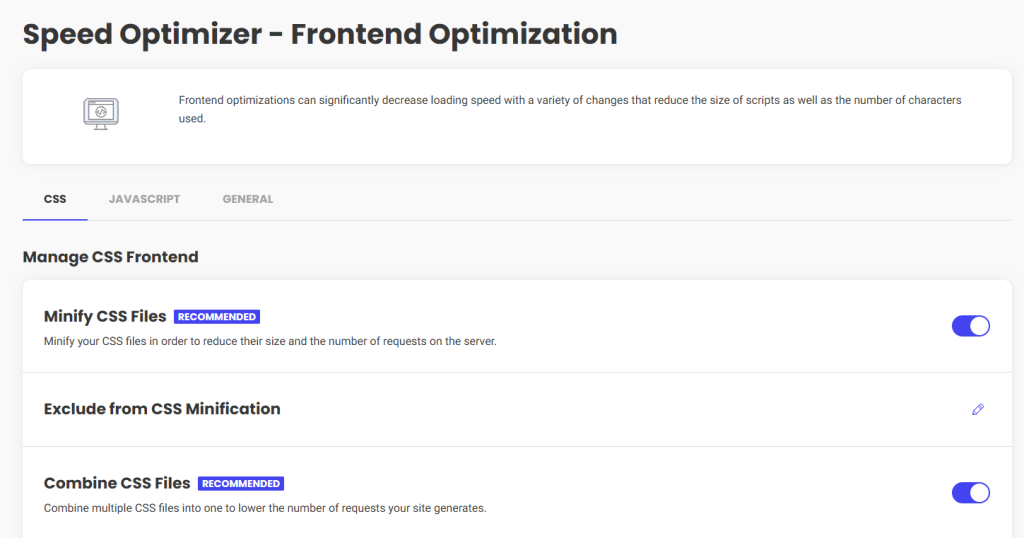
It sounds too good to be true: why isn't everyone doing it? In my view, the bar really is this low. Test again after any change, though, because speed tools can sometimes break a menu or a form.
If your site doesn't work well on a phone, it doesn't work.
Want a hand making your electrician website work on mobile?
You can get a hand making your electrician website work on mobile from Electrician SEO Pro, as part of a full SEO service for your electrical business, or do it yourself with PageSpeed Insights and your own phone. Either way, the aim is the same: a fast site, a visible number and nothing in the customer's way.
Once your phone site is sorted, my local SEO guide for electricians covers what to tackle next. If you'd rather spend your evenings pricing jobs than squeezing images, I can take it off your hands, alongside the rest of your SEO.
See how I can help, or crack on yourself.
Over to you.