

A 301 redirect on an electrician's website is a permanent move notice that automatically sends visitors and Google from an old page address to a new one, and Google then shows the new page in search results instead. It helps an electrician's SEO, because the old page's rankings and links carry over to its replacement. Electrician SEO Pro's rule for electricians is to set one up whenever a page changes address, is merged or is deleted and a close replacement exists.
How does a 301 redirect work for an electrician's website?
A 301 redirect works for an electrician's website by telling browsers and Google that a page has moved permanently, so anyone who visits the old address lands on the new one automatically, and Google shows the new address in its results. Electrician SEO Pro's rule is to use one whenever a page's address changes and you still want the visitors, links and rankings it earned.
Think of it as a sign on your old shop door: "We've moved, here's the new address." It tells two audiences two different things:
- Google: "This page isn't here any more, index the new one instead."
- Visitors: "Don't worry, we've got you, here's the content you were looking for."

Without one, this is what a visitor gets instead:

A dead end. Every dead end wastes a visitor, and any links pointing at it stop doing their job.
Google's redirects guide treats a 301 as a permanent move and shows the new address in results. A 302 is the temporary version, and for those Google keeps showing the old page. If the move is permanent, use a 301.
Ever updated a page address, or scrapped a service you don't offer any more, without a redirect? I'm betting you have. Does it actually help your SEO, though?
Does a 301 redirect help an electrician's SEO?
Yes, a 301 redirect helps an electrician's SEO, because it passes the old page's links and ranking signals to its replacement, so a page can change address or be merged without starting from zero. The limits: the new page should be a close replacement for the old one, Google needs time to process the move, and a redirect can't make a weak page rank. Electrician SEO Pro treats 301s as the way to protect rankings you've already earned.
Google's guide on moving a site says keeping redirects in place is what lets it transfer ranking signals to the new addresses. In practice, that gives you three wins:
- Saves your rankings. The authority the old page earned goes to the new one.
- Keeps your backlinks working. Links pointing at the old address still count.
- Fixes the visitor experience. Nobody likes a broken link.
Skip the redirect and it's like changing your phone number and expecting your old customers to figure it out. They won't. Neither will Google.
So when exactly do you need one?
When should an electrician use a 301 redirect?
An electrician should use a 301 redirect any time a page's address changes or the page is removed or merged and a close replacement exists, so visitors, links and Google all land on the right page instead of a dead end. Electrician SEO Pro's rule is simple: if the old page earned traffic, leads or links, send it to its closest replacement.
Here are the usual moments (all made up):
- You changed a URL. You tidied /services into /electrical-services. Anyone, or any search engine, still visiting the old address needs to land on the new one automatically.
- You deleted a page. That old EICR article you removed. If anyone links to it, or it still shows in Google, you're losing visitors unless it redirects somewhere relevant.
- You merged two pages. You combined /fuse-box-installation and /consumer-units into one. The old addresses should point at the new master page.
- You moved domain. jbelectrics.co.uk became jb-electrical-services.co.uk. Redirect every single page, or you risk starting your SEO from scratch.
- You cleaned up your URL structure. An old mess like /2021/07/fuse-box-repair-service becomes /fuse-box-repair. Redirect the old one to the clean one. Choosing good addresses in the first place is covered in my guide to URL structure for electrician websites.
And when not to use one: if a page should stay live but be treated as a copy of another, that's a canonical tag, not a redirect, and my guide to canonical tags for electricians explains the difference. If the move is only temporary, that's a 302. If a page is gone and nothing close replaces it, see where a redirect should point.
Before you set anything up, you need to know which addresses are broken.
How can an electrician find broken URLs that need a 301 redirect?
An electrician can find broken URLs that need a 301 redirect in Google Search Console, by opening Indexing, then Pages, and checking the "Not found (404)" reason under "Why pages aren't indexed", which lists URLs Google tried to visit and couldn't. Electrician SEO Pro's rule is to look at each URL before redirecting it, because not every 404 is a problem.
The quick route:
- Log in to Search Console.
- Go to Indexing, then Pages.
- Under "Why pages aren't indexed", click "Not found (404)".
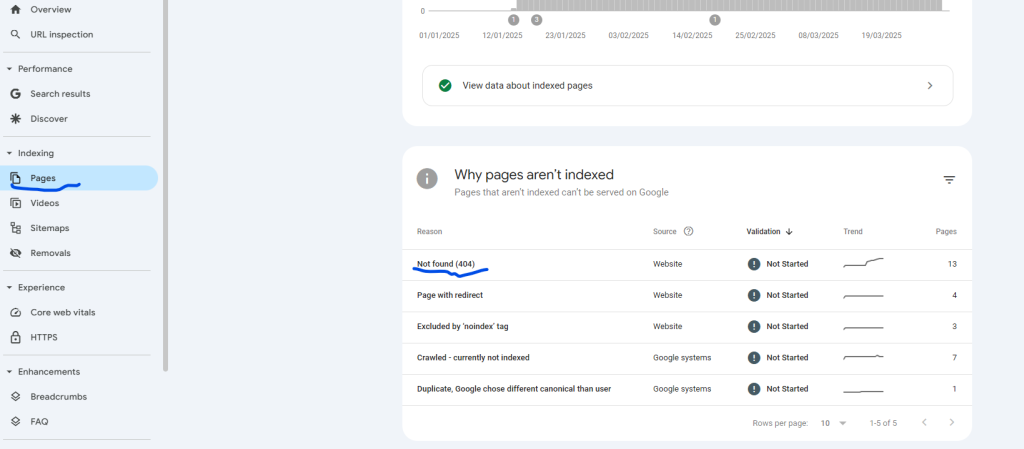
These are URLs Google tried to visit and failed. Not all of them are a problem, though. Here's the list from my own Search Console:
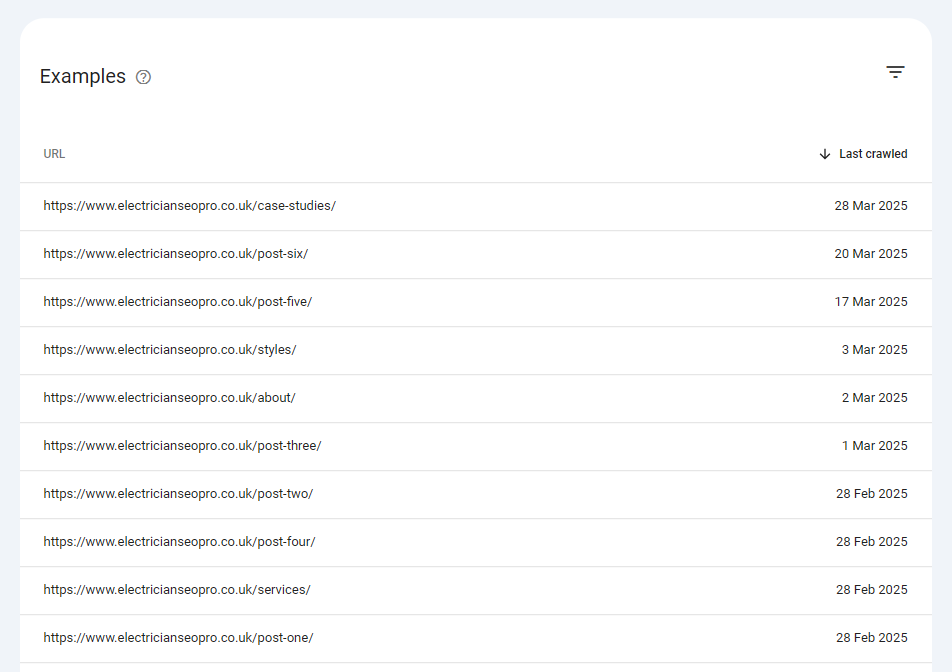
Most of those came with a demo theme, so they've rightly been left as 404s. Click into each one and ask: is this page still relevant? If it's a real page that moved, it needs redirecting to its new address. If it's gone for good, redirect it to the closest relevant page, or leave it as a 404 if nothing fits.
Found some? Next question: where should each one go?
Where should an electrician's 301 redirect point?
An electrician's 301 redirect should point to the page that replaces the old one most closely, not to the homepage by default. If nothing close replaces a page, leaving it as a 404 is better than redirecting it somewhere unrelated. Electrician SEO Pro's rule is one hop, to the most relevant live page, so nobody gets sent on a detour.
Say you've deleted your old Socket Installation page and now cover sockets on a Home Electrical Services page (made up). That's where the redirect goes. Here's how it looks:
- Good: /socket-installation/ to /home-electrical-services/
- Bad: /socket-installation/ to the homepage
- Bad: /socket-installation/ to /home-electrical-services/, then on to /services/ (a chain)
Sending everything to the homepage is the lazy version. The visitor wanted sockets, got a homepage and left. Point each old address straight at its final destination: one hop, not a chain.
Right, time to set one up.
How do electricians set up a 301 redirect in WordPress?
Electricians set up a 301 redirect in WordPress by installing the free Redirection plugin, opening Tools then Redirection, entering the old address as the Source URL and the new live address as the Target URL, and clicking Add Redirect. Electrician SEO Pro's rule is to test the old address afterwards, to confirm it lands on the new page.
It's quick, with zero fluff:
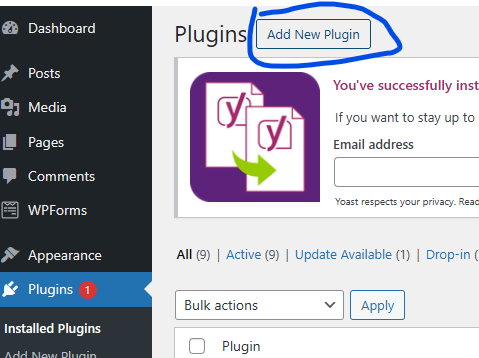
- Go to Plugins, then Add New Plugin.
- Search for "Redirection" and find the one by John Godley.
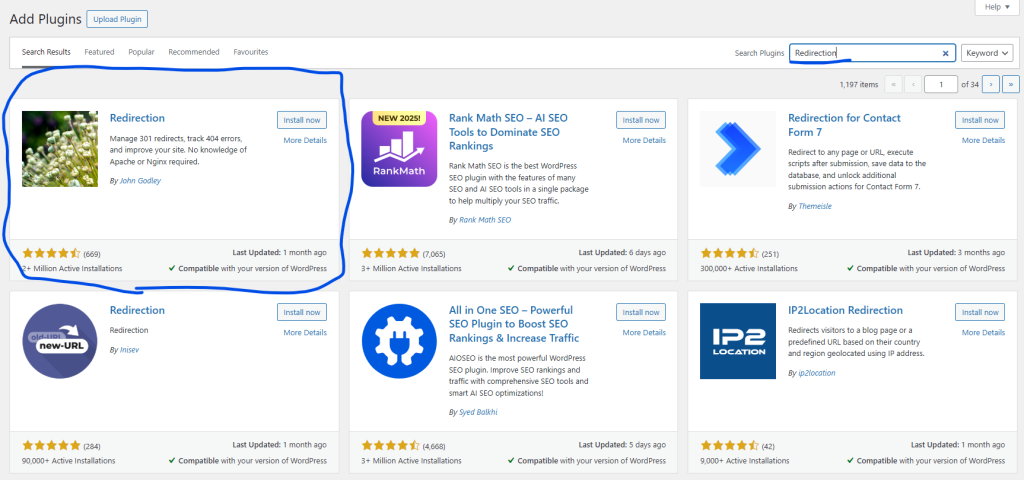
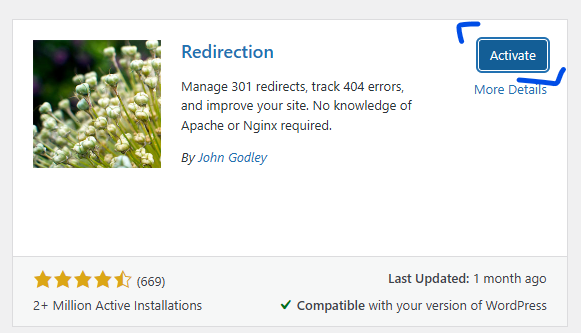
- Click Install, then Activate.
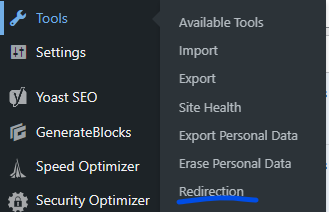
- Go to Tools, then Redirection.
- Add your old URL (the broken one) in the Source URL box, your new live URL in the Target URL box, and hit Add Redirect.
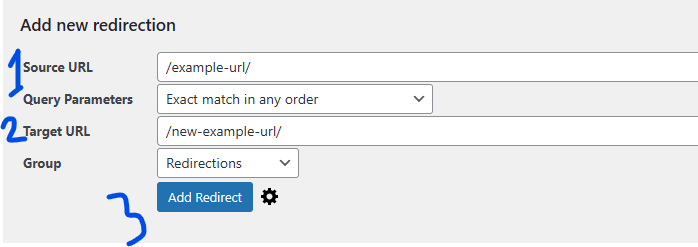
Boom. You've just rescued a dead end. Check the redirect type is 301 (Moved Permanently) in the plugin's options, behind the cog next to Add Redirect, then visit the old address to see it land on the new page. As a bonus, this plugin also logs 404s, so you'll see broken pages as they pop up. Not on WordPress? Look for a redirects section in your site builder, or ask whoever built the site.
One last question: how long do you keep it?
How long should an electrician keep a 301 redirect in place?
An electrician should keep a 301 redirect in place for as long as possible, and for at least a year, which is what Google's site move guidance recommends. Old links, bookmarks and customers keep using the old address long after Google has moved on. Electrician SEO Pro's rule is to treat redirects as permanent and never remove one just to tidy up.
Google's guide to moving a site says to keep redirects for as long as possible, generally at least a year. The same guide warns against pointing lots of old addresses at one irrelevant page, such as the homepage, which it says might be treated as a soft 404. So keep them, and keep them relevant.
Redirects are boring, and I'd bet plenty of site owners never look at them. They keep deleting pages and changing addresses, then wonder why their rankings drop. You'll be the one keeping your traffic, trust and visibility intact. All it takes is a 301 redirect.
Boring beats losing leads.
Want a hand fixing the redirects on your electrician website?
You can get a hand fixing the redirects on your electrician website from Electrician SEO Pro, as part of a full SEO service for your electrical business, or sort them yourself with Search Console and a redirect plugin. Either way, the aim is the same: no dead ends, and every old address leading to the right page.
If you want the rest of the technical side, my technical SEO guide for electricians covers it. If you'd rather spend your evenings pricing jobs than hunting 404s, I can take it off your hands, alongside the rest of your SEO.
See how I can help, or crack on yourself.
Over to you.