

A canonical tag on an electrician's website is a line of code in a page's head that tells Google which URL is the main version when several addresses show the same content, and it is a signal Google uses to decide which page to rank. Electrician SEO Pro's rule for electricians is one canonical tag per page, pointing at itself unless the page is a deliberate copy. Get it wrong and you can tell Google to rank the wrong page.
How does a canonical tag work for an electrician's duplicate pages?
A canonical tag works for an electrician's duplicate pages by naming one URL as the preferred version, so Google can treat the other addresses as copies and pool their signals, such as links, onto the preferred page. Google treats the tag as a strong signal rather than an order, and it can still choose a different version if the pages aren't really duplicates. Electrician SEO Pro's rule is to make the whole site agree: the tag, your internal links and your sitemap should all point at the same address.
Here's the picture, using a made-up fuse box page on a made-up site:
https://www.smith-electrical.co.uk/fuse-box-upgrades/
https://www.smith-electrical.co.uk/fuse-box-upgrades/?utm_source=facebook
Same page, two addresses. Without a canonical tag, Google has to guess which one you want people to see. With one, the second address says: the main version lives at the first.
Google's own guide to specifying a canonical ranks the clues it uses, in order of strength: redirects first, then the canonical tag, then your sitemap as a weak signal. So the tag carries real weight, but it isn't a command.
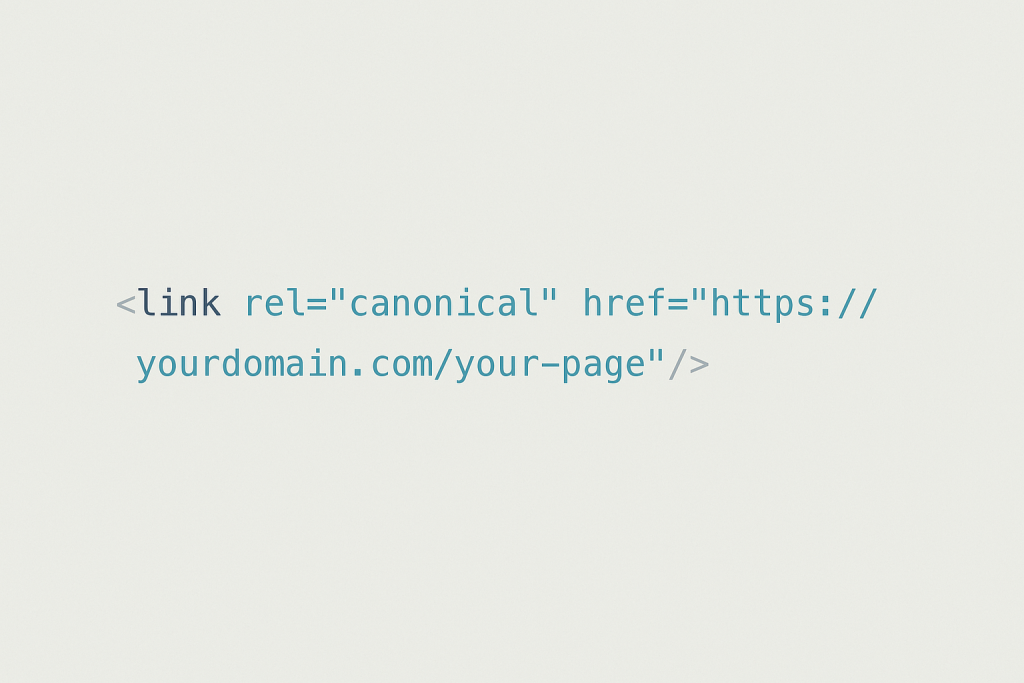
Most electricians have never heard of canonical tags, and I'd bet plenty of web designers skip them too. This is what one looks like:
So it picks a winner among duplicates. But is that a ranking signal?
Is a canonical tag a ranking signal for electricians?
Yes, a canonical tag is a ranking signal for electricians, because it tells Google which version of a page to index and rank, and it pools the links and other signals from the duplicates onto that version. Electrician SEO Pro rates it as a genuine signal that protects your pages, with plain limits: it only works between duplicate or very similar pages, Google can overrule it, and it won't lift a page that has no duplicates.
Notice what that means. A canonical tag doesn't make a page better, it decides which of your pages gets the credit. Point it at the right page and your links and rankings pile onto one address instead of being split across several. Point it at the wrong page and you've told Google to rank something you didn't want ranked, and to sideline the page you did.
Which raises the obvious question: where do duplicates come from in the first place?
Why do duplicate pages happen on an electrician's website?
Duplicate pages happen on an electrician's website when the same content can be reached at more than one address, usually through tracking links, near-identical town pages, filtered or sorted lists, blog archives, or the http, https, www and non-www versions of the site. Google then has to guess which address to rank. Electrician SEO Pro's rule is to list every way a page can be reached, then make one of them the official address.
Here are the usual suspects (all made up):
- Tracking links. You run a Facebook ad that sends people to /fuse-box-upgrades?utm_source=facebook. Google can see that as a separate page from /fuse-box-upgrades. The fix is a canonical tag holding the clean address.
- Near-identical town pages. Same copy, different town name. They get their own section next.
- Filtered or sorted lists. /services, /services?sort=price and /services?filter=emergency are three addresses for nearly the same list. Point the canonical at /services.
- Blog categories, tags and archives. The same post can turn up in lists at /category/vehicles and /tag/charging. Those pages rarely need to rank, so if you don't need them in Google, set them to noindex.
- http, https, www and non-www. The old-school one, and still brutal. If your site answers at http://www.smith-electrical.co.uk, https://www.smith-electrical.co.uk and https://smith-electrical.co.uk, Google can see several copies of every page. Redirect them all to one version, and point your canonical tags at it.
You don't have to be a spammer to end up with duplicate content. Most electricians doing local SEO run into it without realising.
Town pages deserve their own answer, because that's where electricians are most tempted to cut corners.
Should an electrician use a canonical tag on near-identical town pages?
An electrician should not reach for a canonical tag first on near-identical town pages: the better fix is to make each page genuinely different, with local jobs, local reviews and local detail. Use a canonical tag on town pages only when they truly have to stay near-identical, and accept the cost, because the page you point away from stops being the one Google can rank. Electrician SEO Pro's rule is to publish a town page only when you can make it genuinely different.
Say you've built these (made up):
/ev-charger-installation-leeds
/ev-charger-installation-york
Same structure, same copy, and the only change is the town name. Google can see those as duplicates, and it isn't wrong.
Fix one, the proper one: make each page earn its place with jobs you've done in that town, reviews from customers there, and details that only apply to that area.
Fix two, the shortcut: if the pages really must stay similar, canonical the weaker ones to the strongest. Just know what that does: if York points at Leeds, Google will usually show Leeds, and York stops being a page that can rank for York searches.
Pages competing with each other is a problem of its own, covered in my guide to keyword cannibalisation for electricians. And how to build a town page that deserves to exist is in my service page blueprint for electricians.
Right, enough theory. How do you actually set one?
How do electricians set a canonical tag on their website?
Electricians set a canonical tag on their website by adding a link tag marked rel="canonical", holding the full preferred address, inside the head of the page, which on WordPress means the Canonical URL box in Yoast or Rank Math. Always use the full address with https, not just the slug. Electrician SEO Pro's rule is a self-referencing canonical on every page, and a different address only on a page you deliberately want Google to treat as a copy.
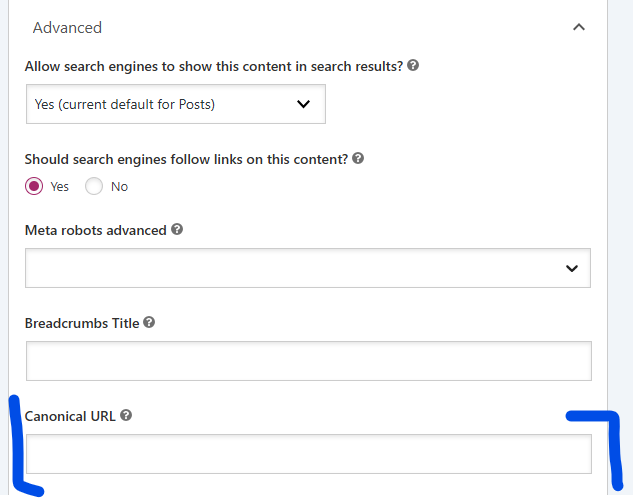
WordPress (Yoast or Rank Math). Good news: it's mostly done for you. Yoast and Rank Math both add a self-referencing canonical automatically, so most pages need nothing. To point a page somewhere else, open it, scroll to the SEO box and find the Canonical URL field. In Yoast it's under the Advanced tab. Rank Math is similar, in its sidebar. Paste in the full address.
Plain HTML. If you or your web person works in raw code, add this line inside the head of the page:
<link rel="canonical" href="https://www.smith-electrical.co.uk/fuse-box-upgrades/" />Google's guide says the tag is only accepted inside the head, and that full addresses beat relative paths, which it says can cause problems in the long run. So not /fuse-box-upgrades/ on its own. Every page should carry a canonical that points at itself, even when it's the original. It removes any doubt about what you meant.
Wix and Squarespace. Both add a canonical to every page for you. Wix lets you change it page by page in the Advanced SEO tab, while on Squarespace changing it generally means adding code. If SEO is how you win your work, I'd move to WordPress, where you get full control.
Once it's set, the next question is how a canonical differs from a redirect.
Should an electrician use a canonical tag, a 301 redirect or noindex?
An electrician should use a canonical tag when a duplicate page has to stay live, a 301 redirect when a page is gone or merged, and a noindex tag when a page should stay live but never appear in Google. Electrician SEO Pro's rule is one clear instruction per page: never tell Google a page is a copy of another and also tell it to leave the page out of the index.
Here's how I'd split them:
- Canonical tag: "this page can stay live, but treat that other page as the main one." Say five EV charger town pages are 90% the same (made up). Canonical the weaker ones to the strongest. Visitors still see every page, and Google credits one.
- 301 redirect: "this page is gone, send everyone to that one instead." Say you delete your old Socket Installation page and fold it into a general Home Electrical Services page (made up). Hit it with a 301. How that works, and how to set one up, is in my guide to 301 redirects for electricians.
- Noindex: "keep this page out of Google." Say the thank-you page people see after a contact form (made up). Visitors need it, Google doesn't.
Don't mix them on one page. A canonical says "index the other version instead", noindex says "index nothing", so together they're a mixed signal and Google has to guess which you meant. Pick one.
Mixed signals are just one way this goes wrong. Here are the rest.
What canonical tag mistakes should electricians avoid?
The canonical tag mistakes electricians should avoid are pointing the tag at the wrong page, using a relative path instead of the full address, putting the tag outside the head, combining a canonical with noindex, and setting up loops where two pages point at each other. Each one tells Google to rank, or ignore, the wrong page. Electrician SEO Pro's check is to open each important page and ask whether its canonical points at the page you actually want ranking.
Here's how each one looks, with the fix (all made up):
- Wrong page: the Leeds EV charger page with a canonical pointing at the York page, easy to do when you copy a page and forget the tag. Better: check the tag on every copied page before it goes live.
- Relative path: href="/fuse-box-upgrades/". Better: the full address, https included.
- Outside the head: the tag pasted into the body of the page. Better: it belongs in the head, nowhere else.
- Canonical plus noindex: two opposite instructions on one page. Better: pick one.
- Loops: page A says B is the main version, and page B says A is. Don't do this. Better: both point at the one page you want ranking.
The nasty thing about all of these is that nothing looks wrong on the page. The damage shows up in Google.
So how do you find out whether you've got any of them?
How can electricians check their canonical tags?
Electricians can check their canonical tags by viewing a page's source and searching for "canonical", by comparing the canonical they declared with the one Google chose in Search Console, or by crawling the site with a tool such as Sitebulb. Electrician SEO Pro checks that every important page has a canonical pointing at itself, unless it is a deliberate copy.
Here's the order I'd do it in:
- Check the page source. Right-click a page, choose "View page source" and search for "canonical". You want one tag, near the top, holding the full address of that same page.
- Ask Search Console. Paste the address into the URL Inspection tool, which Google's help page explains, and compare "User-declared canonical" with "Google-selected canonical". If they differ, Google disagrees with you, and it's worth finding out why.
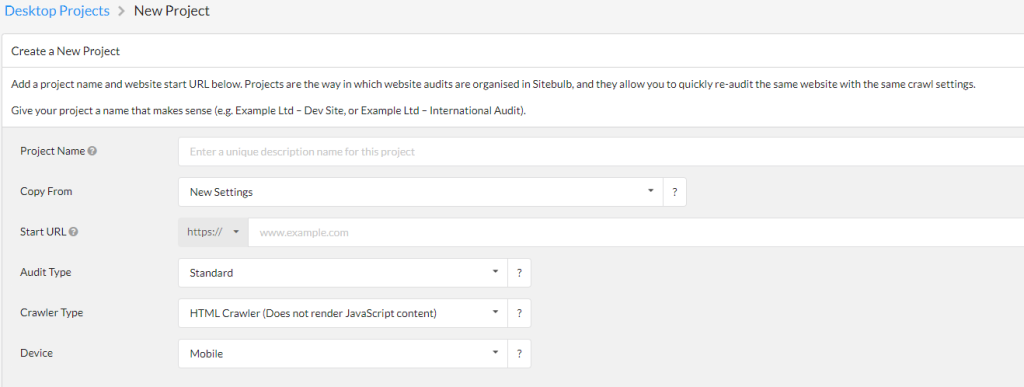
- Crawl the site. Fire up Sitebulb, enter your address and run a crawl. It flags canonical problems you didn't know existed, such as missing tags, pages whose canonical points elsewhere, conflicting tags and loops. Any crawler that reports canonicals will do the job.
- Ask the real question. Forget the data for a second: is Google ranking the page I want it to rank? If not, a canonical might be the fix. Every important page should have a self-referencing canonical unless you've deliberately pointed it elsewhere, so fix the ones that don't today.
You don't need to be an SEO expert. You just need to be the electrician who's switched on.
Want a hand sorting out your electrician website's canonical tags?
You can get a hand sorting out your electrician website's canonical tags from Electrician SEO Pro, as part of a full SEO service for your electrical business, or check them yourself with the page source and Search Console. A canonical check covers your duplicate pages, tracking links and town pages. Either way, the aim is the same: one page, one address, and every tag pointing where you mean it to.
If you want the rest of the technical side, my technical SEO guide for electricians covers it. If you'd rather spend your evenings pricing jobs than reading page source, I can take it off your hands, alongside the rest of your SEO.
See how I can help, or crack on yourself.
Over to you.