

Breadcrumbs in SEO for an electrician's website are the trail of links near the top of a page, such as Home, Services, Fuse Box Upgrades, that shows visitors and Google where the page sits in the site. They are a ranking signal, because each one is an internal link, and on desktop Google can show the trail in your listing. Electrician SEO Pro's rule for electricians is to add them, because they take minutes to set up and keep paying off.
How do breadcrumbs work on an electrician's website?
Breadcrumbs work on an electrician's website by showing a trail of clickable links from the homepage down to the page you're on, so a visitor can jump back up a level and Google can see how your pages are organised. A fuse box page, for example, might read Home » Services » Fuse Box Upgrades. Electrician SEO Pro's rule is that every step except the last is a real link to a real page.
Here's the trail on one of my own posts, outlined in blue:

Breadcrumbs do two jobs, and they do them quietly.
For people. If someone lands deep in your site from Google, they can see where they are and jump back a step, without hitting the back button like a maniac. Say they came for your blog on fuse box warning signs (made up). Now they click back up to your Electrical Safety category. They're deeper in your site, and trusting you a little more with each scroll. That's how a blog reader becomes a customer.
For Google. It sees which pages link to which, which are top-level and which are buried. If Google can see how your pages fit together, it finds and understands them more easily.
That sounds useful. But do breadcrumbs actually help you rank?
Are breadcrumbs a ranking signal for electricians' websites?
Yes, breadcrumbs are a ranking signal for electricians' websites, because each breadcrumb is an internal link that shows Google how a page connects to your service and category pages, which helps Google find, understand and rank them. Electrician SEO Pro rates breadcrumbs as a genuine structure signal, with plain limits: they support pages that already deserve to rank, they don't make up for thin content, and the trail Google can show in a listing appears on desktop only.
Think of breadcrumbs as internal linking you don't have to remember. Every page gets a link up to its service category and another to the homepage, with sensible words in the link. Across the whole site, that gives Google a clear map of what sits under what.
What they won't do is rescue a weak page. A tidy trail on a thin page is still a thin page. If you're still working out where your internal links should go, my guide to internal linking for electricians is the place to start.
Now the part people get excited about: the trail in the search results.
Do breadcrumbs show in Google results for electricians?
Breadcrumbs can show in Google results for electricians, but only on desktop: when a page has breadcrumb markup, Google can show the trail in the listing instead of the plain web address. Electrician SEO Pro's rule is not to add breadcrumbs for the listing alone, because the trail is a bonus and the internal links and easier navigation are the real return.
Google's breadcrumb guide says the feature is available on desktop, so don't expect the trail on a phone. That matters, because plenty of electrician searches happen on phones.
Here's the idea, with a made-up address. Without a trail you get something like:
smith-electrical.co.uk/services-rewiring-leeds-electricianWith one, you can get something like:
smith-electrical.co.uk » Services » RewiringWhich one do you think looks better? Here's a real listing for an electrician in Leeds, with the trail outlined in blue:
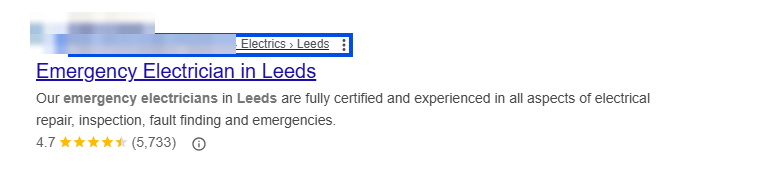
Google decides when to show it, so treat it as a nice surprise, not a promise.
So how do you actually add them? WordPress first.
How do electricians add breadcrumbs to a WordPress website?
Electricians add breadcrumbs to a WordPress website by switching on the breadcrumb option in their theme or, if the theme has none, by enabling the breadcrumbs feature in the Yoast SEO plugin and placing it with the Yoast breadcrumbs block, a shortcode or a line of theme code. Electrician SEO Pro's rule is to check the theme first, because the built-in switch is the quickest route and needs no code.
Option 1: your theme. Many modern WordPress themes have breadcrumbs built in, you just have to switch them on:
- In your WordPress dashboard, go to Appearance, then Customize.
- Look for a Breadcrumbs option, usually under Header or General settings.
- Toggle it on and hit Publish.
Check a few pages. If you can't see a trail, your theme doesn't support it, so move on to option 2.
Option 2: Yoast SEO. Yoast's breadcrumbs feature works on most themes, even ones with no switch of their own:
- In your dashboard, go to Yoast SEO, then Settings.
- Open the Advanced section, then the Breadcrumbs tab.
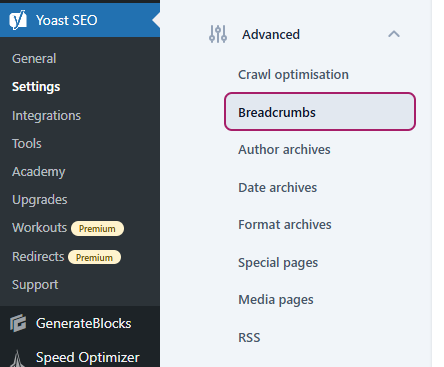
- Scroll right down to the bottom and switch on "Enable breadcrumbs for your theme".
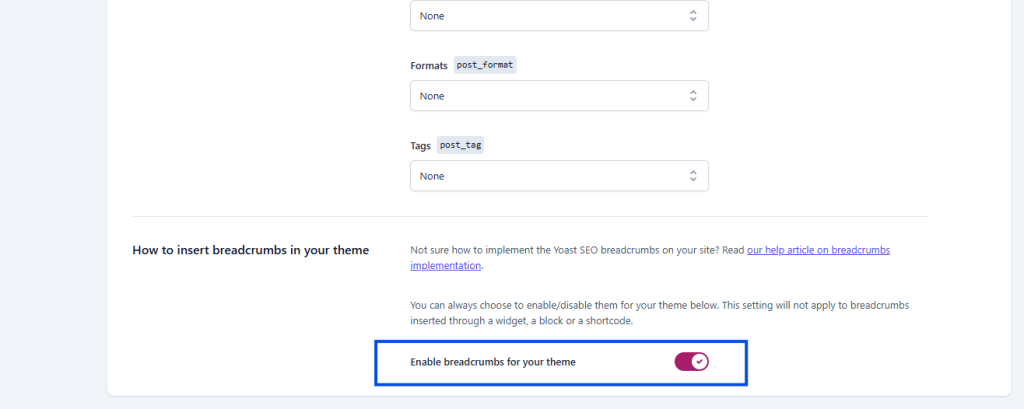
There are other settings in there, but the defaults are generally fine. I left them as they were on my own site.
Now show them on the page. Yoast gives you three ways: the Yoast breadcrumbs block in the editor (search for it when you add a block), a shortcode, or a line of theme code so the trail appears on every page. The block and shortcode only show a trail where you place them, while theme code covers the whole site. For the theme code route, take a backup first, because a typo in a theme file can take the site down. Then go to Appearance, then Theme File Editor, open page.php, single.php or header.php (it depends on your theme) and paste this where the trail should appear, usually below the header:
<?php if ( function_exists('yoast_breadcrumb') ) { yoast_breadcrumb( '<p id="breadcrumbs">','</p>' ); } ?>Save, then check your site. The trail should now show everywhere.
No WordPress? You can build them by hand.
How do electricians add breadcrumbs to an HTML website?
Electricians add breadcrumbs to an HTML website by writing the trail as a nav element holding an ordered list of links, with the current page as plain text at the end, and pasting it into each page where the trail should appear. Electrician SEO Pro's rule is to keep the trail in plain HTML links, so that both visitors and Google can follow it.
Here's the structure:
<nav aria-label="Breadcrumb" class="breadcrumb">
  <ol>
    <li><a href="/">Home</a></li>
    <li><a href="/services/">Services</a></li>
    <li>Fuse Box Upgrades</li>
  </ol>
</nav>
If you want it to look tidy, add some basic CSS:
.breadcrumb ol { list-style: none; display: flex; gap: 5px; padding: 0; }
.breadcrumb li::after { content: ">"; margin: 0 5px; }
.breadcrumb li:last-child::after { content: ""; }
Save, upload and refresh, and visitors can follow your trail.
One catch. That code gives people the trail on the page, but the trail in a Google listing comes from breadcrumb markup behind it, called BreadcrumbList structured data. Yoast adds it for you on WordPress. On a hand-built site you add it yourself, or ask whoever builds your site to, and Google's breadcrumb guide lists what it needs.
Either way, what should the trail actually say?
What should an electrician's breadcrumb trail look like?
An electrician's breadcrumb trail should look like the route a customer would take to the page: it starts at the homepage, passes through the section the page belongs to, and ends on the current page, for example Home » Services » Fuse Box Upgrades. Electrician SEO Pro's rule is to mirror how customers would browse to the page, not how the web address is built, and to keep every label short and plain.
Here's how that looks in practice (all made up):
- Good: Home » Services » Fuse Box Upgrades
- Good, for a blog post: Home » Electrical Safety » Fuse Box Warning Signs
- Bad: Home » Page » Page 2 » Fuse Box Upgrades
- Bad: Home » Cheap Emergency Electrician Leeds Fuse Box Upgrades Near Me
The good ones read like where you'd tell a customer to look. The bad ones are either meaningless or a keyword list in a trench coat.
Every step before the last should link to a real page, so make sure your Services page exists rather than leaving a label that goes nowhere. That's much easier when your pages are organised sensibly in the first place, which is what my guide to URL structure for electrician websites is about.
Last job: making sure it all works.
How can electricians check their breadcrumbs work?
Electricians can check their breadcrumbs work by opening a few pages on a phone and a computer, confirming the trail shows near the top, and clicking every step to be sure it lands on a real page. To check the markup, run a page through Google's Rich Results Test. Electrician SEO Pro's rule is to check one service page, one blog post and one category page after switching breadcrumbs on.
Here's the quick version:
- Look. Open a service page and a blog post on your phone and on a computer. The trail should sit near the top, and each step should be easy to tap.
- Click. Follow every step. Each one should land on a real page, not a 404.
- Test the markup. Run a page through the Rich Results Test and look for a Breadcrumbs result with no errors.
- Read the labels. Short, plain and honest. No keyword stuffing.
It's a small change that helps. Get it done.
Want a hand adding breadcrumbs to your electrician website?
You can get a hand adding breadcrumbs to your electrician website from Electrician SEO Pro, as part of a full SEO service for your electrical business, or switch them on yourself with your theme settings or Yoast. Either way, the aim is the same: a clear trail on every page, with every step linking to a real page.
If you want the rest of the technical side, my technical SEO guide for electricians covers it. If you'd rather spend your evenings pricing jobs than editing theme files, I can take it off your hands, alongside the rest of your SEO.
See how I can help, or crack on yourself.
Over to you.