Google Ads work for electricians because they put the business at the top of Google when someone nearby is searching for an electrician. Search Ads charge per click, Local Services Ads charge per lead, and both suit ready-to-book jobs such as emergency call-outs. Electrician SEO Pro’s view is that they perform best once conversion tracking and a sharp landing page are in place, and that they belong alongside SEO, not instead of it.
Google ads for electricians is hands-down one of the fastest ways to get more calls from people who are ready to book right now.
If you’re not showing up when someone Googles “electrician near me,” you’re losing money.
And while Google Search Ads are the most well-known PPC tool, they’re not the only one.
Don’t worry, this guide walks you through what actually works to get more booked jobs:
- What Are Google Ads?
- Why Electricians Should Use Them
- What Other Types of PPC Ads Exist
- How to Set Up A Google Ad Campaign
- How To Optimise One
Sound good? Let’s jump in:
What Are Google Ads (PPC) for Electricians?
Simply: you’re paying to show up at the top of Google when someone in your area searches for an electrician.
You pick the keywords, set the budget, and Google does the matchmaking.
You just pay when someone clicks.
How Does PPC Work?
PPC isn’t just about buying your way to the top. It’s an auction.
Here’s the quick version:
- You choose a set of keywords (like “emergency electrician Leeds”).
- You tell Google how much you’re willing to pay every time someone clicks.
- Google throws your ad into an auction with other electricians bidding on the same keywords.
- The winner isn’t just the highest bidder. It comes down to something called Ad Rank.
How Ad Rank Is Calculated:
Ad Rank = how Google decides who shows up first, second, third, etc.
It’s made up of:
- Your bid: how much you’re willing to pay per click.
- Your ad quality: is your ad actually relevant and helpful?
- Expected performance: based on things like your assets (call buttons, sitelinks), landing page experience, and click-through rate.
- Search context: stuff like the user’s location, device, and the exact time of day.
That’s why a well-written, properly targeted ad can outrank a lazy one, even if the competitor’s spending more.
Why Should Electricians Use Google Ads?
Because “word of mouth” doesn’t cut it when someone’s sitting in the dark Googling for help.
Google Ads puts you in front of customers exactly when they’re searching for a service like yours.
PPC gives you the power to:
- Show up instantly when someone searches for your service
- Target your exact local area
- Appear above competitors and map listings
- Drive phone calls, not just clicks
And sure, you can run ads on TikTok or Facebook too, but if you want red-hot, high-intent traffic that converts into booked jobs, Google Search Ads and Local Services Ads are where it’s at.
What Are The Benefits of PPC?
Here’s the deal: PPC gives you speed.
When someone needs an electrician fast, they’re not scrolling blog posts or digging through the 7th organic result.
They’re clicking what’s at the top.
And that’s where PPC shines:
✅ Instant visibility – show up today, not 3 months from now
✅ Laser targeting – only show to people in your area searching for your exact services
✅ Pay-per-lead (in LSAs) – you’re not wasting money on “maybe” clicks
✅ Full control – set your budget, pause it anytime, test what works
✅ Data you can act on – know exactly which clicks turn into phone calls and jobs
PPC isn’t here to replace SEO. It’s here to speed up the game while SEO ramps up in the background.
Okay, but what about the drawbacks of PPC?
What Are the Drawbacks of PPC for Electricians?
PPC is definitely not a silver bullet, and it’s definitely not “set it and forget it.”
You will 100% dry up your monthly marketing budget in a matter of weeks, and you’ll get nothing in return if you go into it without a single clue on what to do.
Here are the most common downsides you need to watch out for:
❌ High cost – clicks can be expensive, especially in competitive areas.
❌ Limited trust – many people scroll past or block ads entirely.
❌ Time-heavy – good results need constant testing and tweaking (babysitting).
❌ No autopilot – you can’t set it and forget it, campaigns need managing.
Bottom line? PPC works when it’s run properly.
If you’re not keeping an eye on it or don’t know what you’re doing, it can bleed your budget dry.
What Types of PPC Ads Exist for Electricians
Before you go ahead and run your own Google PPC campaign, let’s first take a look at your options.
The key to picking the right one(s) is knowing which ad types line up with your goals.
Whether you want more booked jobs, or just to get your name in front of homeowners, there’s a PPC format that fits.
Let’s break them down:
Google Search Ads
These are the text ads that show up at the very top (or bottom, depending on the bid) of Google search results whenever someone types in a query like “electrician near me” or “emergency electrician in Leeds.”

They’re labelled as “sponsored” but don’t underestimate them, people click when they’re in a pinch.
What makes them powerful:
- You appear right when someone is actively looking for your service.
- You can control what the ad says and where it links to.
- You can use click-to-call buttons, service links, location info, reviews, and more to build trust instantly.
This is the ad type that generates real leads when urgency is high.
Paired with a solid landing page and smart targeting, it becomes your most reliable lead-gen machine AFTER word of mouth (and even SEO, if you decide to go down that route too).
YouTube Instream Ads
These are the video ads that show before or during YouTube videos, and yes, they’re the ones people try to skip.

But when done right, they can actually work.
They’re about staying visible, reinforcing trust, and warming up the people who already know you.
Best uses for electricians:
- Retargeting visitors who’ve been on your site but didn’t book
- Promoting your brand in your local area
- Showing off visual proof, like before/after jobs, testimonials, or a “meet the team” video
They don’t generate leads instantly, but they can move someone closer to calling when they need you.

If your budget’s tight or you’ve got zero video content, skip it.
But if you’re already running Search or LSAs and want to layer in brand recognition? These can help.
Google Display Ads
These are the image-based banner ads that follow people around the internet, on news sites, blogs, apps, and more.
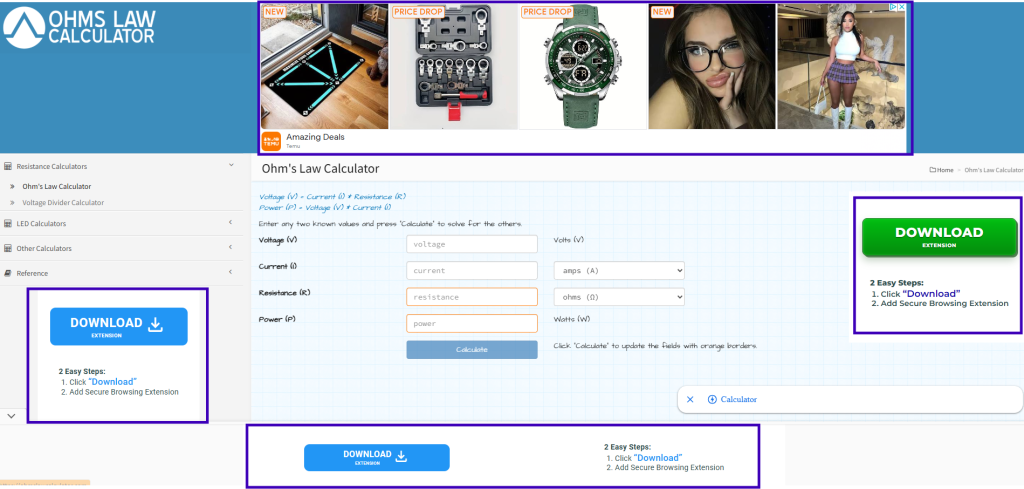
They’re best used for staying top-of-mind after someone’s already interacted with your business.
Although, they can definitely encourage someone to circle back to your website after they’ve left.
Display ads work well for:
- Retargeting visitors who didn’t convert the first time
- Keeping your logo/service in front of local customers
- Promoting offers or brand awareness across the web
They’re cheap per click, but don’t expect red-hot leads. Think of them as digital follow-up flyers.
Use display ads to gently remind people you exist, don’t expect it to help you close deals.
Paid Social Media Ads (Facebook/Instagram)
These are the ads you see while scrolling Facebook, Instagram, or TikTok.

They pop into your feed between baby photos and memes, and yes, they can work for electricians, but only when used right.
Again, just like the last few on this list, paid social is less about intent and more about visibility.
Best used for:
- Promoting limited-time offers or seasonal deals
- Re-targeting people who’ve visited your site or watched a video
- Building awareness in your local area
But be warned:
- Most people aren’t in “hiring mode” when they’re on social media
- Clicks are cheap, but conversions can be lower
Use it to warm up your audience, not close the sale.
And always run these alongside Search or LSAs, never on their own.
Google Local Services Ads (LSAs)
These are the top-of-the-page powerhouses.
LSAs appear above search ads and map listings:
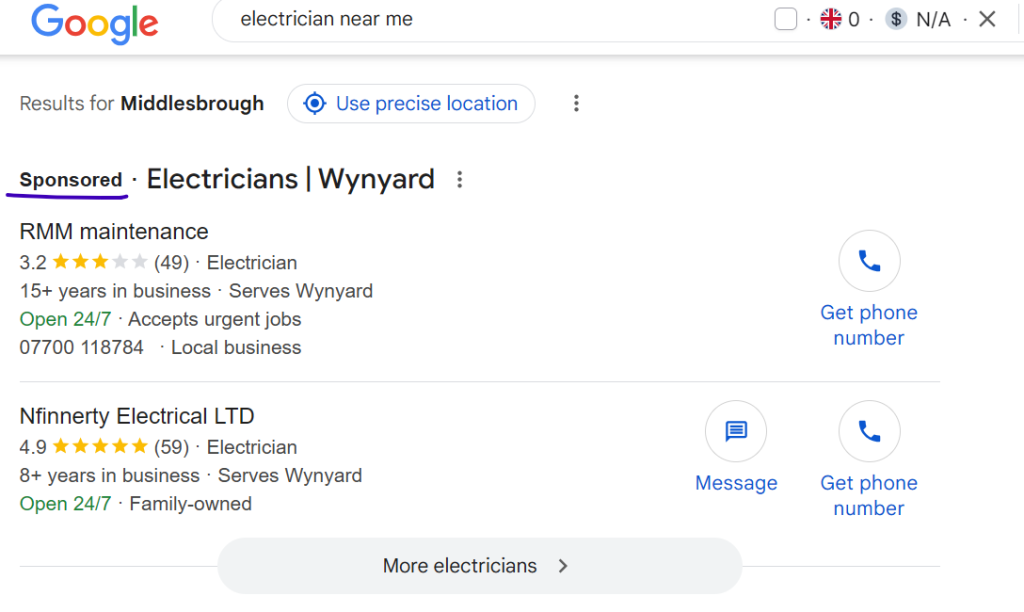
And unlike regular PPC, you only pay when someone actually contacts you.
That’s right: you’re not paying for clicks, you’re paying for real phone calls and messages.
Why they’re gold:
- Prime placement = instant trust
- Google screens and verifies your business
- You show up exactly when someone needs help in your area
- The Google Verified badge (the blue tick) backs you up
Quick 2026 heads-up here, because this changed and a lot of older guides have it wrong: Google scrapped the old green “Google Guaranteed” badge in late 2025 and rolled everything into a single “Google Verified” blue tick. The money-back guarantee that came with the old badge is gone too, so don’t go promising customers that. What hasn’t changed is that getting verified still matters to rank at all.
Usually only a handful of companies show up in this section (around three), so competition’s fierce. But if you can get in, LSAs deliver high-quality, ready-to-book leads. And because you pay per lead and not per click, the maths is dead simple.
Want to know what actually gets you ranked in LSAs? Three things: your reviews (both the score and how many you’ve racked up), how fast you respond, and how close you are to the person searching. A quick responder bidding £50 will beat a slow one bidding £75 every single time. So funnel every happy customer towards leaving you a Google review, and answer the phone fast.
One more handy bit: you can now hook LSAs up to booking tools like Jobber or ServiceTitan, so people can book you straight from the ad without even ringing.
Pro tip: follow up with every missed call or message. They clicked for a reason, so don’t let them slip away.
Still not convinced PPC is right for your business? Here’s a deeper look at some of the differences depending on the work you do:
Commercial vs Residential PPC
Not all electrician jobs, or customers, are the same.
And that means your PPC strategy shouldn’t be either.
What works for a local electrician doing quick home jobs won’t cut it for a commercial outfit bidding on multi-phase tenders or wiring up entire office blocks.
Before you start building your campaign, it’s worth understanding the differences between residential and commercial electrician PPC:
PPC for Commercial Electrical Businesses
If you’re running a commercial electrical company, your PPC approach needs to be bigger, sharper, and more strategic.
You’re not trying to book a quick fuse repair, you’re positioning for contracts with office parks, industrial units, or government buildings.
That means longer sales cycles, bigger job values, and more decision makers in the room.
Competition is also tougher.
You’ll need higher budgets, tighter keyword targeting, and smarter ad copy to stand out.
This isn’t just about generating leads though.
It’s about building visibility so when those big projects come up, you’re already on their radar.
PPC for Residential Electrical Businesses
If you’re targeting homeowners, landlords, or tenants, your PPC game is a bit different.
You’re looking for fast-turnaround jobs like socket installs, rewires, or emergency call-outs.
That means short sales cycles and one decision maker.
You don’t need a massive ad budget.
You just need to be visible when someone searches “electrician near me” at the exact moment they need help.
Residential PPC is about high-intent keywords, tight local targeting, and making it dead easy for someone to pick up the phone.
Basically, the whole process, while still using PPC, is completely different from how it would be for commercial electrical businesses.
What are Local Services Ads for electricians?
Local Services Ads are Google’s pay-per-lead ads for local trades, shown at the very top of the results with a Google Verified badge, which replaced the old Google Guaranteed badge in October 2025. An electrician pays when a customer contacts them through the ad, not per click, sets a weekly budget, and is ranked on reviews, response time and distance from the person searching. Electrician SEO Pro’s view is that they suit ready-to-book jobs once a business is verified and has a steady stream of reviews.
The badge is what customers notice. It sits next to your name and tells them Google has verified the business, which is a big part of why these ads get the call. Where they fall down is control: you can’t write the ad or pick the keywords, so your reviews and how fast you respond do the selling for you.
So should you run them, Search Ads, or both?
Should electricians use Local Services Ads or Google Search Ads?
Electricians should start with both Local Services Ads and Google Search Ads where the budget allows, because they work in different ways. Local Services Ads charge per lead (£15 to £30 on average) and only a handful of firms show at the top of the page. Search Ads charge per click (£2 to £8 on average) and let an electrician choose the keywords, the ad copy and the landing page. Electrician SEO Pro’s rule is to get these two working before looking at Performance Max or paid social.
Here’s how the two split in practice:
- Local Services Ads: you pay when someone actually contacts you, so the maths is dead simple. With only around three firms in that top spot, competition’s fierce. Google ranks you on your reviews (the score and how many), how fast you respond and how close you are to the person searching. A quick responder bidding £50 beats a slow one bidding £75 every single time.
- Search Ads: you write the ad, choose the keywords and pick the page people land on, and you can add click-to-call buttons, service links and reviews to build trust. This is the one that brings in real leads when urgency is high.
Both catch people who are searching for an electrician right now, which is why I’d get them humming before anything fancier. The catch with Local Services Ads is that getting verified still matters to rank at all. The catch with Search Ads is that you pay for every click, good or bad, so the control comes with homework.
Whichever you start with, Google’s platform has shifted a lot lately, so here’s what’s changed.
What’s Changed in Google Ads for 2026
If you set up a campaign a couple of years ago and left it ticking over, the platform has shifted under your feet. Here’s what’s worth knowing before you build.
Google has gone all-in on AI. The big one is AI Max for Search, which came out of beta in April 2026 and is now the direction Google is pushing everyone towards. You feed it your keywords, your ad copy, and your landing pages, and it does more of the matching itself, finding searches you’d never have thought to bid on. Google says campaigns using the full AI Max feature set see an average of 7% more conversions or conversion value at a similar cost per acquisition, compared with search term matching alone. Dynamic Search Ads are being folded into it, with the automatic upgrade due to start in February 2027.
My take? It can work a treat, but only once your conversion tracking is rock solid and you’ve got a tidy list of negative keywords. Switch it on before that and you’re handing Google a blank cheque. Nail the foundations first, then let the AI off the leash.
Search itself looks different now. Google’s AI Overviews sit at the top of loads of results these days, and ads now show above them, below them, and sometimes inside them. People are also searching in longer, more natural ways (“who can fix a tripping fuse box near me today” rather than just “electrician near me”). That’s another reason the old obsession with exact-match keywords is fading. Write ads and landing pages that answer real questions, don’t just cram a keyword in and hope.
Broad match has had a glow-up. It used to be a money pit. Paired with Smart Bidding and proper conversion tracking, it’s a lot smarter now. Even so, for a local electrician on a tight budget, I’d keep things on phrase or exact match until your tracking and negative keywords are pulling their weight. Then test broad match on a small budget and watch it like a hawk.
Performance Max exists, but tread carefully. PMax is Google’s all-in-one AI campaign that runs across Search, Maps, YouTube, Gmail, the lot. Brilliant for some businesses. For a local electrician chasing phone calls, it can spray your budget across placements that never convert. Start with Search and LSAs. Only look at PMax once those are humming and you’re ready to scale.
How much do Google Ads cost for electricians in the UK?
Short answer: it depends on where you work and what you sell. Search Ads charge you per click, Local Services Ads charge you per lead. These are the numbers I work from:
- Cost per click (Search Ads): £2 to £8 on average, with London coming out higher.
- Monthly budget (Search Ads): most local electricians see results with £300 to £1,500 a month, as the FAQ below says. £300 to £500 is the minimum to get usable data, and £500 is the number to aim for if you want to test properly.
- Cost per lead (Search Ads): aim for £15 to £40 per qualified lead. £100 per lead and no booked jobs means something’s off.
- Local Services Ads: £15 to £30 per lead on average, creeping up as more trades pile in. Smaller towns sit closer to £15, while cities like London or Manchester run at £25 to £30+. You set a weekly budget (£50 a week or £500 a week is up to you) and the ads pause when you hit it.
What Pushes the Cost Up or Down?
- Emergency vs planned work: “24 hour emergency electrician” is the search most of your rivals bid on, so those clicks tend to cost more. Planned jobs like consumer unit upgrades and EV charger installs are higher-ticket, so know what a booked job is worth.
- Location: London costs more than a smaller town, for clicks and LSA leads alike.
- Competition: more electricians bidding on the same keywords means a higher price, which is why cost per lead has crept up in busier cities.
- Landing page: one that matches your ad and makes calling easy improves your Quality Score, which can lower your cost per click, and it turns more clicks into enquiries.
Do the sum: £5 a click, with 1 in 10 clicks ending in a booked job, works out at £50 per job (not per enquiry). That can still be worth it if your average job is £300+. Pay for irrelevant clicks and that cost can easily double or triple. Check Google’s Keyword Planner for your own area rather than trusting anyone’s averages, mine included.
Weighing ads against SEO? I’ve compared them in Google Ads vs SEO for electricians, and my electrical contractor advertising ideas guide has rough costs for the other channels.
What keywords should an electrician bid on in Google Ads?
An electrician should bid on keywords that show intent to hire, such as “electrician near me” or “emergency electrician in Leeds”, plus their own business name, and block the searches that never become jobs with negative keywords. Searches from people ready to book are the ones worth paying for, not people researching the trade or hunting for free help. Electrician SEO Pro’s rule is to stay on phrase or exact match until conversion tracking and negative keywords are pulling their weight, then test broad match on a small budget.
Here’s what I’d put on the list. Keywords worth paying for:
- “electrician near me”
- “emergency electrician in Leeds” (swap in your own town)
- “consumer unit upgrade” plus your town
- your own business name, so a rival’s ad doesn’t show when someone Googles you
And negative keywords worth adding on day one:
- “how to become an electrician”
- “free electrical help”
- “free”, “DIY” and “course”
Emergency searches like “24 hour emergency electrician” are the ones most of your rivals bid on, so those clicks tend to cost more. Planned jobs like consumer unit upgrades and EV charger installs are higher-ticket, so know what a booked job is worth before you decide what a click is worth. Keyword Planner is free and shows you the real numbers for your area, and my keyword research guide for electricians covers how to find the searches in the first place.
Got your keywords? Time to build the campaign.
How to Set Up A Google Ads Campaign
You don’t need a degree in marketing to launch a solid PPC campaign, but you do need a plan.
Whether you’re going after residential call-outs or long-haul commercial projects, the setup process matters.
Below are the core steps every electrician should follow to build a campaign that actually brings in leads (instead of just burning through budget).
Step 1: Define Your PPC Goal
Before you touch Google Ads or set a budget, get crystal clear on what you want to achieve.
Do you want more calls? More form submissions? Brand awareness?
Every decision that follows, your ad type, your copy, your budget, depends on this.
Don’t just say “get more customers.” Be specific. As specific as you can possibly be.
Example:
Reach 100 prospects through PPC in the next 60 days, and convert at least 20 into booked jobs. Track everything through form fills, phone calls, or booking confirmations.
Use the SMART framework if it helps (Specific, Measurable, Achievable, Relevant, Time-bound).
But most importantly, make your goal trackable AND achievable.
Step 2: Know Your Audience
Your ads are only as good as your targeting.
If you’re showing up for the wrong people, or the wrong searches, you’re wasting budget.
Start with your audience:
- Who are they? Homeowners? Landlords? Business owners?
- Where are they located?
- What problems are they trying to solve?
Build a basic profile of your ideal customer.
If you’ve been in business a while, talk to real customers or review past jobs to spot patterns.
If you’re just starting out, stalk your competitors’ reviews and ads.
Step 3: Keyword Research Time
Then do your keyword research.
This is what tells Google what searches your ad should show up on.
Tools like Google’s Keyword Planner are free and give you:
- What people are actually searching for (and how often)
- How competitive each keyword is
- How much it might cost per click
Go after keywords that match your service and show intent to hire.
For example the following keywords are PERFECT to run ads alongside:
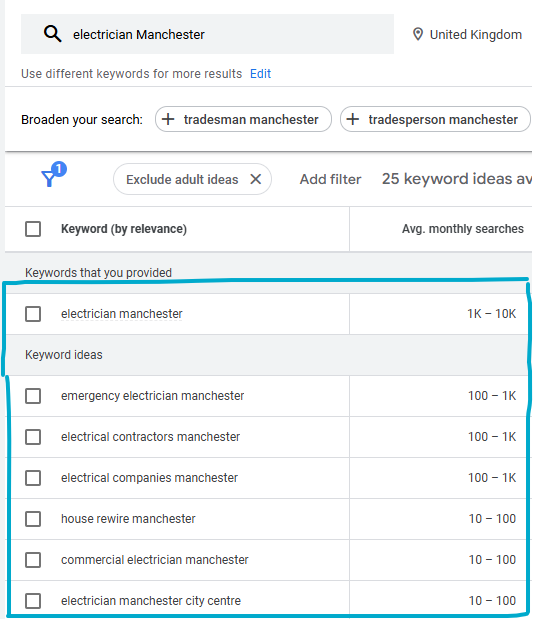
Stick with commercial or transactional intent keywords.
These are the people who are actually ready to book.
You can also bid on your own business name (aka branded keywords) to protect your turf.
If someone Googles you and your competitor’s ad pops up instead? You’re losing a lead you already earned.
Step 4: Set Your Budget
Now that you know your goal and your keywords, it’s time to talk money.
Your PPC budget should reflect two things: how much each click costs and how well your website converts visitors into customers.
Use Google’s Keyword Planner to check the average cost-per-click (CPC) for your target keywords.
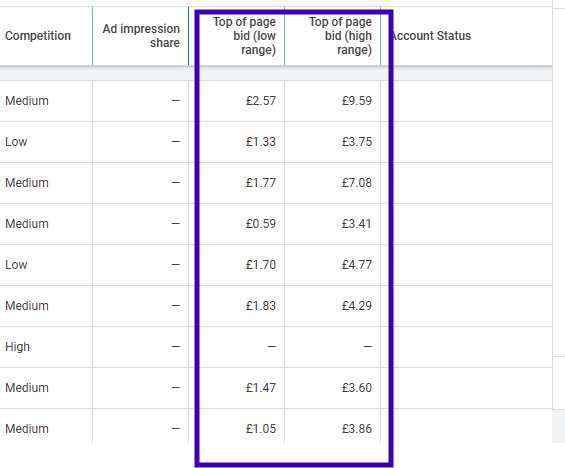
Then estimate how many clicks you’ll need to get a lead, and how many leads you want per month.
Example:
- Average CPC = £5
- You want 20 leads/month
- Your site converts at 10%
- You’ll need ~200 clicks (20 ÷ 0.10)
- 200 clicks × £5 = £1,000/month budget
Once you’ve got your budget, pick a bidding strategy that matches.
If your goal is volume, go with “Maximise Conversions.”
If you’re watching costs closely, set a Target CPA (cost per acquisition) inside Maximise Conversions, which keeps Google honest about what you’ll pay per lead.
Start small, test fast, and scale what works and sever the head of what doesn’t.
Step 5: Build a High-Converting Landing Page
Your ad got the click, now your landing page has one job: seal the deal.
The best landing pages do three things really well:
- Match the ad headline and promise (don’t bait-and-switch)
- Make it easy to take action, like call or fill out a form
- Align with the user’s intent (emergency repair, quote request, etc.)
If your ad says “24/7 Emergency Electrician,” your page better lead with that and have a big fat click-to-call button front and centre.
Landing page tips that boost conversions:
- Use clear headlines that echo your ad
- Break up content with bullet points (like this)
- Keep plenty of white space, don’t clutter
- Make your CTA (call-to-action) obvious and high up
- Use high-contrast fonts for readability
- Optimise for mobile, most people search on their phones
Here’s a great page that demonstrates this:
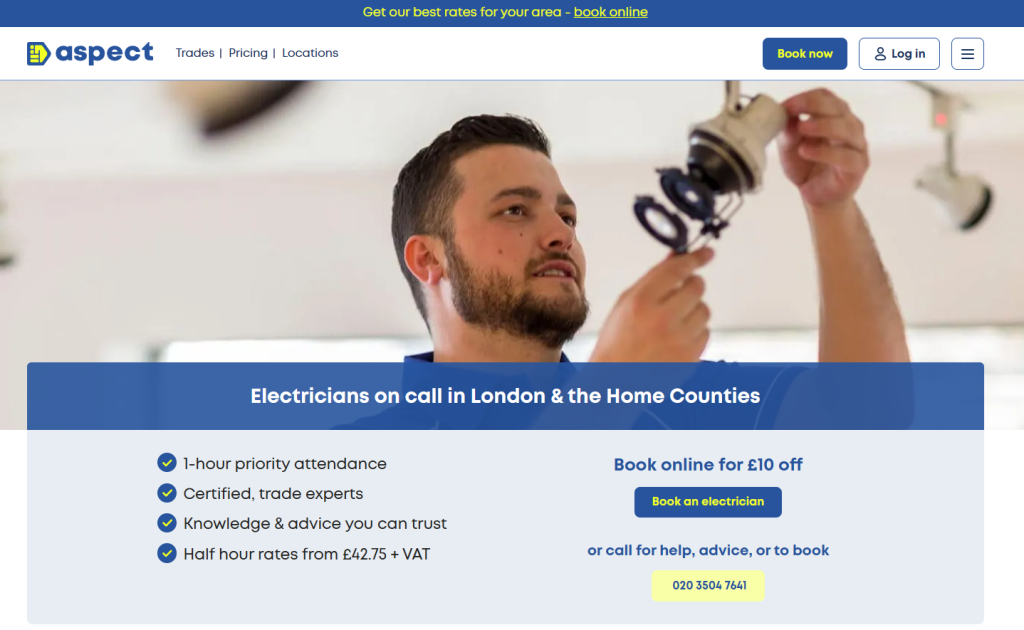
A solid landing page doesn’t just increase conversions, it improves your Quality Score too, which can lower your cost per click.
Step 6: Write Your Ad
Your ad copy is where the magic starts, it’s the pitch that gets the click.
Whether it’s a text ad on Google or a visual one on social, you need to grab attention fast and make your offer clear.
Tips to write ads that convert:
- Lead with what people care about most (e.g. “24/7 Emergency Electrician”)
- Mention location or service area to build trust
- Use strong CTAs like “Call Now” or “Book Online Today”
- Be clear about who it’s for, and who it’s not (to filter out time-wasters)
Use all the space Google gives you.
The more you include, like phone numbers, reviews, links, and callouts, the more real estate your ad takes up, and the more legit it looks.
And the less guesswork readers have to do, the less friction there is, which makes it easier to convert them.
Pro tip: use your ad copy to filter leads.
For example, if you only want homeowners, say that in the ad.
It’ll save you wasted clicks from renters, landlords, or tyre-kickers.
Things To Remember: Best Practices for Electrician PPC
Once your campaign’s live, don’t just sit back and hope for the best. The difference between an average PPC campaign and a high-performing one usually comes down to a few key habits and tactics.
Here are the best practices that separate the pros from the money-burners:
- ⭐ Use Negative Keywords: block out irrelevant searches like “how to become an electrician” or “free electrical help.”
- ⭐ Target Your Local Area Only: set your location targeting to only show ads to people physically in your service area. Keeps your spend tight.
- ⭐ Qualify Clicks in Your Copy: make it clear who the ad is for, like “Homeowners Only” or “Commercial Properties Welcome.”
- ⭐ Retarget Site Visitors: not everyone books the first time. Retargeting ads help you stay top of mind and bring them back.
- ⭐ Test, Test, Test: always run A/B tests on headlines, CTAs, and offers. The best results often come from small tweaks.
- ⭐ Leverage Call Tracking: know exactly which ads bring in real leads, not just clicks. Use tracking numbers tied to campaigns.
Treat your PPC campaign like a system, not a gamble.
Every click is a data point. Use that data to sharpen your results over time.
How can an electrician tell if Google Ads are bringing in booked jobs?
An electrician can tell if Google Ads are bringing in booked jobs by tracking every call and form enquiry as a conversion, then checking which of those enquiries turned into paid work. Clicks and calls are not the result, because Google counts a missed call or a wrong number as a conversion too. Electrician SEO Pro’s rule is to judge a campaign on cost per booked job, using call tracking or a simple CRM to match each lead to a job.
Do the sum on booked jobs, not enquiries. At £5 a click, with 1 in 10 clicks ending in a booked job, each job costs £50 (not each enquiry). That can still be worth it if your average job is £300+.
What I’d set up:
- Conversion tracking for calls and form enquiries, through Google Ads and Google Analytics.
- Call tracking numbers tied to your campaigns, so you know which ad made the phone ring.
- A CRM (or even a simple sheet) that records which leads turned into paying jobs.
Be careful with “conversions”. A missed call or a wrong number still counts in Google’s eyes, so a healthy-looking number can hide an empty diary. Review it weekly and tweak it monthly. My tracking and reporting guide for electricians shows how to close the loop between calls and jobs.
Tracking tells you what’s happening, so here’s how to act on it.
Optimising Your Campaign
Launching your ad is just the beginning.
Tracking & Improving Results
Now it’s time to track what’s working, and fix what isn’t.
To get the best ROI from your PPC campaign, you need to keep one eye on performance at all times.
Here are the key metrics electricians should monitor:
- Click-through rate (CTR): measures how many people saw your ad and actually clicked. If this is low, your copy might be weak or irrelevant.
- Impressions: total times your ad was shown. Too low? You might be bidding too little.
- Conversion rate: what percentage of clicks turn into booked jobs. If this is low, your landing page probably needs work.
- Cost per lead (CPL): how much you’re paying to get each enquiry or booking. This needs to make sense with your average job value.
- Quality Score: Google’s rating of your ad, keywords, and landing page combo. A higher score = lower costs and better positions.
Use Google Ads and Google Analytics to track this data. But be cautious, just because someone clicked or called doesn’t mean they booked.
Pro tip: not all “conversions” are created equal.
A missed call or wrong number still counts in Google’s eyes. To get the full picture, you’ll want proper call tracking or a CRM system that tells you which leads turned into paying jobs.
Great campaigns don’t run on autopilot. They’re tweaked, tested, and fine-tuned week after week.
Troubleshooting
So you’ve followed the guide, set your budget, and the clicks are rolling in, but the phone’s not ringing.
Don’t panic. Even the best campaigns need tuning. Here’s how to troubleshoot the most common PPC issues electricians face:
⚠️ Problem: Lots of clicks, no calls
- Your landing page might be confusing, slow to load, or missing a strong call-to-action.
- Fix: simplify your landing page. Add a click-to-call button. Match your message to the ad.
⚠️ Problem: No one’s clicking your ads
- Your ad copy might be weak, irrelevant, or targeting the wrong keywords.
- Fix: rewrite headlines. Use more urgent or benefit-driven language. Tighten your keyword list.
⚠️ Problem: You’re getting bad leads (wrong locations, tyre-kickers)
- Your targeting might be too broad. Or your copy’s attracting the wrong crowd.
- Fix: add negative keywords (like “free,” “DIY,” “course”).
- Make your copy more specific, e.g. “Homeowners only” or list your city.
⚠️ Problem: Your cost per lead is way too high
- You might be overpaying for generic keywords.
- Fix: focus on long-tail, intent-driven phrases like “licensed electrician in your town” or “same day fuse box repair.”
⚠️ Problem: You’re getting impressions but no clicks
- Either your ad isn’t compelling, or someone else is outbidding you.
- Fix: rework your copy. Add sitelinks, phone numbers, and trust signals. Test new headlines.
Final Tip: don’t guess, use the data. Google Ads and Analytics will tell you what’s working. Review it weekly, tweak it monthly.
A/B Testing
A/B testing is how smart electricians fine-tune their ads over time. Instead of guessing what works, you let the data do the talking.
At its core, it’s simple: you run two slightly different versions of your ad, landing page, or offer, and see which one brings in more leads.
Let’s say you’re not sure if “Call Now for Fast Repairs” works better than “Same-Day Electrician Available.” With A/B testing, you try both. After a week or two, you check the numbers and roll with the winner.
Same goes for landing pages. Want to know if a click-to-call button beats a contact form? Test it. Want to know if showing your reviews increases trust? Test it.
Here’s the golden rule: test ONE thing at a time. Don’t rewrite everything and hope for the best. Change a single headline, or button colour, or call-to-action, and watch what happens.
Once you find a winner, keep it, then test something else. Over time, these small tweaks stack up and turn average campaigns into booked-solid lead machines.
Avoiding PPC Scams & Wasted Budget
Running Google Ads doesn’t just mean watching your clicks, it also means watching your back. There are plenty of PPC “experts,” shady agencies, and rip-off shortcuts that promise leads but deliver dust.
If you’re not careful, you could end up paying for:
- Fake clicks from bots or click farms
- Leads in the wrong area because your targeting was set too wide
- Pointless keywords that look good on paper but bring in zero calls
- Agency fees for campaigns you could run better yourself
Here’s how to protect yourself:
- ✅ Don’t outsource blindly. If someone’s managing your ads, demand monthly reports. Real reports. Calls, conversions, cost per lead, not just impressions and click-through rates.
- ✅ Own your accounts. You should always have access to your Google Ads account. If your agency “owns” it, you’re locked in.
- ✅ Watch for black box promises. Anyone who says “We’ll get you 100 leads a month, guaranteed,” without explaining how, is full of it.
- ✅ Check targeting settings. Are your ads showing to people 100 miles outside your service area? You could be paying for useless clicks.
- ✅ Review your keywords. Broad match terms like “electric” or “fuse” can waste your money. Until your tracking and negatives are solid, lean on phrase match or exact match.
- ✅ Monitor where your money’s going. Set up conversion tracking so you know what actually becomes a job.
The platform works. It’s the people running it that make or break your ROI.
Electrician Ad Copy Templates (Swipe These)
Need some ad inspiration? Here are proven formulas you can swipe and customise. Each one is designed to grab attention and convert, without sounding like every other ad out there.
Example 1: Emergency Service
24/7 Emergency Electrician in Your Town No call-out fee. Fast response. Call now, problem solved today.
Example 2: Local Trust Builder
Rated 5-Stars by Local Homeowners NICEIC Approved. Local. Trusted. Book your electrician in 60 seconds.
Example 3: No-Nonsense Offer
Need an Electrician? Get a Quote in Minutes. Transparent pricing. Qualified engineers. Click to book today.
Example 4: Commercial Focused
Reliable Electrical Contractor for Offices & Retail Fully certified. Project-ready. On-time, every time. Get in touch now.
Example 5: Seasonal/Promo Angle
Free Electrical Safety Check This Month Only Book your inspection before the end of the month. Limited availability. Call now.
Tip: use these as a starting point, then adapt them to your brand voice and target audience. Always make sure your ad message matches your landing page to keep conversions high and bounce rates low.
(PPC) Tools Electricians Should Use
You don’t need a massive tech stack to run a killer PPC campaign, but having the right tools definitely helps. Here are some essentials every electrician should have in their toolbox:
- Google Keyword Planner – free and reliable. Helps you find high-intent keywords, see what people are searching, and estimate CPC (cost-per-click). Also useful for scoping out competitor keywords.
- Google Ads – the main hub where you’ll run your campaigns, manage ad spend, monitor performance, and set up targeting and bidding strategies.
- Google Analytics – tracks what users do after clicking your ad. Helps you figure out if your landing page is converting, or just leaking leads.
- Google Tag Manager – lets you track actions like button clicks, form submissions, and scroll depth without touching code. Great for electricians who want better insight without hiring a developer.
You don’t need to use every tool on day one.
Start simple with Keyword Planner + Google Ads + Google Analytics.
Then layer in call tracking and testing tools once you’ve got traffic flowing.
FAQs
Do Google Ads work for electricians?
Yes, when they’re done right. Google Ads puts you in front of people actively searching for an electrician in your area. If your campaign is well-targeted, your landing page is sharp, and your offer is clear, it absolutely works. Many electricians rely on it as a steady source of leads.
How much should an electrician spend on Google Ads per month?
It depends on your area and competition, but most local electricians see results with a budget between £300 to £1,500 a month. Start small, get your tracking right, then scale what’s working. Don’t spend big until you know you’re converting.
How long does it take to get results from PPC?
You can get leads same-day if the campaign is set up right. But to get consistent, affordable leads, give it at least 2 to 4 weeks of testing. That’s how long it usually takes to find your best keywords, dial in your ad copy, and get your landing page converting.
Are Google Ads better than SEO?
They do different jobs. PPC is for quick results. SEO is for long-term growth. The best electrical businesses use both, PPC brings in jobs now while SEO builds authority for the future.
Should I run my own ads or hire someone?
If you’re confident with marketing and happy to learn, you can DIY. But if your time’s better spent on the tools (or running your business), hire someone who knows electrician ads inside out. Just make sure you own your account and know what results you’re getting.
What’s a good cost-per-lead for electrician ads?
Most electricians should aim for £15 to £40 per qualified lead, though it’s crept up in busier cities as more trades pile onto the platform. If you’re paying £100 per lead and not booking jobs, something’s off, could be your keywords, landing page, or the quality of the clicks you’re buying.
Why am I getting clicks but no calls?
Usually comes down to one of three things:
- Your ad is misleading or unclear
- Your landing page is confusing or too slow
- You’re showing up for the wrong keywords
Use call tracking, check your conversion rate, and run tests to figure it out.
Fire It Up
Now you’ve got the full picture of how Google Ads for electricians actually works, from setup to strategy to success.
If you’ve read this far, here’s your next move:
- Set your goal.
- Pick your keywords.
- Build your campaign.
- Track every pound spent and every call made.
Whether you DIY it or hire someone to manage your ads, the blueprint’s in your hands.
Just remember: getting leads is only step one. It’s what you do with them that counts.